Example of Working with Python Modules Described in this Post 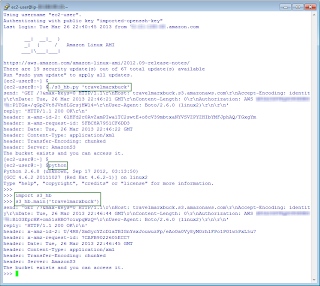
Overview
The goal of this post is to help you get familiar with the boto library as an interface to Amazon Web Services and to do that by trying some simple tasks using Amazon S3. (In case you haven't made the connection yet, boto refers to a type of dolphin native to the Amazon and referred to as Boto in Portuguese.)
Of course if you don't care about rolling your own, but want to use Python, you can use the AWS SDK for Python which has support for S3. With that SDK you can use commands like this "aws s3 list-objects --bucket bucketname". Read on if you are less interested in a command line interface - which the AWS SDK for Python is - and want to see how to create your own Python scripts for working with Amazon S3.
In terms of working with Amazon S3, I was curious to see how I could use Amazon S3 seemlessly from a command shell, manipulating buckets and objects. I was inspired by trying the Google Cloud Storage gsutil tool.
One thing you might note is that the AWS site for Python points to the AWS site for AWS SDK for Python (Boto) which tells you basically to install the boto library assuming you already have Python. In other words, this library is not like the Java or .NET libraries that support AWS services. Even the URL for the docs (boto.readthedocs.org) tells you that something is different since it is not hosted on the AWS domain: docs.aws.amazon.com.
Prerequisites Before Running the Modules
1. Python installed. I run Python 2.6 on an Amazon Linux AMI. Boto currently requires greater than Python 2.5. In particular, I followed the setup instructions here: http://www.pip-installer.org/en/latest/installing.html
$ curl -O https://raw.github.com/pypa/pip/master/contrib/get-pip.py
$ [sudo] python get-pip.py
$ pip install boto
2. AWS Access Key ID and Secret Access Key to access the buckets you want to work with.
- If you are the account owner, great, nothing more to do.
- If you are an IAM user, work with the account owner to get the keys and access to the bucket.
3. Python configured to use the Access Key ID and Secret Access Key as suggested here: http://boto.readthedocs.org/en/latest/boto_config_tut.html.
4. Familiarity with the Python interpreter. I work in and out of the interpreter which I find useful when creating a module. For more information on the interpreter, see Chapter 2. Using the Python Interpreter. One very helpful command you can use in the interpreter is the build-in function dir()which uncovers which names a module defines, basically which properties and methods you can use.
5. An editor. Any editor will do. I use VIM since I developed these modules on Linux.
Usage Notes
Note 1 The very first issue I ran into was a bucket casing issue. If you read the bucket naming guidelines, it states the uppercase characters are okay only for buckets created in the US Standard Region. But even then, if you try to access the bucket using a virtual hosted-style request, e.g. http://MyAWSBucket.s3.amazonaws.com, you will get a bucket not found error. If you use the path style request, e.g. http://s3.amazonaws.com/MyAWSBucket/ then it will work.
To access mixed case named buckets you have to tell the boto library to do so as described here. Boto by default uses virtual hosted-style requests. You can see this by setting the debug level to 2 as described in the Config docs. Short answer is: use lowercased bucket names.
Note 2 The logic for dealing with input arguments was intentionally kept minimal in the modules shown here. In the context of a module, the __name__ global variable is equal to the name of the module. When a module is executed as a script, __name__ is set to __main__. So the common strategy is to check the value of __name__ and if it is equal to __main__ then you know you are dealing with a scripting situation and you can check for input arguments. For more information about modules, see the Python documentation, Chapter 6. Modules. This Artima Developer article provides some different ways of dealing with arguments that are interesting.
Note 3 Some of the modules here show code with fixed parameters (e.g., bucket name) and are not as interesting as a module that takes input arguments like bucket name. This post shows two types of modules, the first type is illustrative and has hardcoded parameters. The second type of module can be takes input arguments.
Note 4 To make a module more useful, you can make the module executable so you don't have to type "python module.py" to run it. Instead you can type "./module.py". Make the module executable by doing the following:
- Put #!/usr/bin/env python as the first line in the module.
- Change the script to executable, e.g. chmod +x s3-lb.py
Note 5 You can run modules in the interpreter as well by importing them and then passing in arguments. For example, you can run modules in the interpreter like so:
>>>import s3_hb, s3_lb
>>>s3_lb.main('')
>>>s3_hb.main('mybucketname')
where s3_hb and s3_lb are modules defined in s3_hb.py and s3_lb.py, respectively. s3_lb.py takes an optional argument. s3_hb.py has one required argument.
If the module named in the import doesn't have a check for __name__ the import action seems to run the module at least on first import.
Modules
Module summary.
| Functionality | Module w/ no Arguments | Module w/ Arguments
optional in italics |
| List buckets | listbuckets.py | s3_lb.py (bucket name filter) |
Create bucket
Delete bucket | createdeletebucket.py | s3_cb.py (bucket name)
s3_db.py (bucket name) |
| Head bucket (see if the bucket exists and you have access to it) | headbucket.py | s3_hb.py (bucket name) |
| List objects in a bucket | listobjects.py | s3_lo.py (bucket name, key prefix) |
Get objects in a bucket
Put objects in a bucket | getputobject.py | s3_go.py (bucket name, key)
s3_po.py (bucket name, file) |
| Delete an object | deleteobject.py | s3_do.py (bucket name) |
| Describe bucket lifecycle | lifecycle.py | |
List Buckets (listbuckets.py)
#!/usr/bin/env python
#list buckets
import boto
conn = boto.connect_s3()
rs = conn.get_all_buckets()
print '%s buckets found.'%len(rs)
for b in rs:
    print b.name
List Bucket with Arguments (s3_lb.py)
#!/usr/bin/env python
#list buckets
import sys
import boto.exception

def main(name_fragment):
    conn = boto.connect_s3()
    try:
        rs = conn.get_all_buckets()
        for b in rs:
            if b.name.find(name_fragment)> -1:
                print b.name
    except Exception, ex:
        print ex.error_message

if __name__ == "__main__":
    name_fragment = ''
    if len(sys.argv)==2:
       name_fragment = sys.argv[1]

    main(name_fragment)
Create/Delete a Bucket (createdeletebucket.py)
#!/usr/bin/env python
#create and delete bucket in the standard region
import boto
from datetime import datetime

bucket_name = 'auniquebucketname'+datetime.now().isoformat().replace(':','-').lower()
conn = boto.connect_s3()
conn.create_bucket(bucket_name)

print 'Creating a bucket %s '%bucket_name
bucklist = conn.get_all_buckets()  #GET Service
for b in bucklist:
    if b.name == bucket_name:
        print 'Found bucket we created. Creation date = %s'%b.creation_date

print 'Deleting the bucket.'

conn.delete_bucket(bucket_name)
Create a Bucket with Arguments (s3_cb.py)
#!/usr/bin/env python
#create bucket
import sys
import boto.exception

def main(bucket_name):
    conn = boto.connect_s3()
    try:
        conn.create_bucket(bucket_name)
        print 'Creating bucket %s '%bucket_name
        bucklist = conn.get_all_buckets()  #GET Service
        for b in bucklist:
            if b.name == bucket_name:
                print 'Bucket exists. Creation date = %s'%b.creation_date
    except Exception, ex:
        print ex.error_message

if __name__ == "__main__":
    if len(sys.argv)==2:
       bucket_name = sys.argv[1].lower()
       main(bucket_name)
    else:
       print 'Specify a bucket name.'
       print 'Example: s3_cb.py bucketname'
       sys.exit(0)
Delete a Bucket with Arguments (S3_db.py)
#!/usr/bin/env python
#delete bucket
import sys
import boto.exception

def main(bucket_name):
    conn = boto.connect_s3()
    try:
        conn.delete_bucket(bucket_name)
        print 'Deleting bucket %s '%bucket_name
        if conn.lookup(bucket_name) == None:
            print 'Bucket deleted.'
        else:
            print 'Bucket may not have been been deleted.'
    except Exception, ex:
        print ex.error_message

if __name__ == "__main__":
    if len(sys.argv)==2:
       bucket_name = sys.argv[1].lower()
       main(bucket_name)
    else:
       print 'Specify a bucket name.'
       print 'Example: s3_db.py bucketname'
       sys.exit(0)
Head Bucket (headbucket.py)
#!/usr/bin/env python
#head bucket
#determine if a bucket exists and you have permission to access it
import boto
import boto.exception
conn = boto.connect_s3()
try:
    buck = conn.get_bucket('travelmarxbucket')
    print 'The bucket exists and you can access it.'
except Exception, ex:
    #print ex.args

    print ex.error_message
Head Bucket with Arguments (s3_hb.py)
#!/usr/bin/env python
#head bucket
import sys
import boto.exception

def main(bucket_name):
    conn = boto.connect_s3()
    try:
        buck = conn.get_bucket(bucket_name)
        print 'The bucket exists and you can access it.'
    except Exception, ex:
        print ex.error_message

if __name__ == "__main__":
    if len(sys.argv)==2:
       bucket_name = sys.argv[1]
       main(bucket_name)

    else:
       print 'Received %s arguments'%len(sys.argv)
       print 'Specify a bucket name.'
       print 'Example: s3_hb.py bucketname'

       sys.exit(0)
List Object in a Bucket (listobjects.py)
#!/usr/bin/env python
#list objects in a bucket
import boto
conn = boto.connect_s3()
try:
    buck = conn.get_bucket('travelmarxbucket')
    bucklist = buck.list()
    for key in bucklist:
        print key.name
except:
    print 'Can\'t find the bucket.'
List Objects in a Bucket with Arguments (s3_lo.py)
#!/usr/bin/env python
#list a bucket with optional prefix
import sys
import boto.exception

def main(bucket_name, prefix):
    conn = boto.connect_s3()
    try:
        buck = conn.get_bucket(bucket_name)
        bucklist = buck.list(prefix=prefix)
        count = 0
        for key in bucklist:
            print key.name
            count +=1
        print '%s key(s) found.'%count

    except Exception, ex:
        print ex.error_message

if __name__ == "__main__":
    if len(sys.argv)>=2:
       bucket_name = sys.argv[1]
       if len(sys.argv)==3:
           prefix = sys.argv[2]
       else:
           prefix = ''
       main(bucket_name, prefix)

    else:
       print 'Specify at least a bucket name and optionally a prefix.'
       print 'Example: s3_lo.py bucketname prefix'
       sys.exit(0)
Put/Get Object in a Bucket (getputobject.py)
#!/usr/bin/env python
#put and get objects
import boto
from boto.s3.key import Key
conn = boto.connect_s3()
buck = conn.get_bucket('travelmarxbucket')

key = Key(buck)

# add a simple object from a string
key.key = 'testfile.txt'
print 'Putting an object...'
key.set_contents_from_string('This is a test.')

# get the object
print 'Getting an object...'
key.get_contents_as_string()

# create a test file
f = open('testfile-local.txt','w')
f.write('A local file. This is a test.')
f.close()

# add an object (upload the file)
key.key = 'testfile-local.txt'
key.set_contents_from_filename('testfile-local.txt')

# get the object
key.get_contents_to_filename('testfile-local-retrieved.txt')
Get Object in a Bucket with Arguments (s3_go.py)
#!/usr/bin/env python
#get object
import sys
import boto
from boto.s3.key import Key
import boto.exception

def main(bucket_name, key):
    conn = boto.connect_s3()
    try:
        buck = conn.get_bucket(bucket_name)
        key_fetch = Key(buck)
        key_fetch.key = key
        key_fetch.get_contents_to_filename(key)
    except Exception, ex:
        print ex.error_message

if __name__ == "__main__":
    if len(sys.argv)>=3:
       bucket_name = sys.argv[1]
       key = sys.argv[2]
       main(bucket_name, key)

    else:
       print 'Specify a bucket name and key to fetch.'
       print 'Example: s3_go.py bucketname key'
       sys.exit(0)
Put Object in a Bucket with Arguments (s3_po.py)
#!/usr/bin/env python
#put object
import os
import sys
import boto
from boto.s3.key import Key
import boto.exception

def main(bucket_name, file):
    conn = boto.connect_s3()
    try:
        buck = conn.get_bucket(bucket_name)
        key_upload = Key(buck)
        key_upload.key = file
        key_upload.set_contents_from_filename(file)
    except Exception, ex:
        print ex.error_message

if __name__ == "__main__":
    if len(sys.argv)>=3:
       bucket_name = sys.argv[1]
       file= sys.argv[2]
       if os.path.isfile(file) == False:
           raise Exception('File specified does not exist.')
       main(bucket_name, file)

    else:
       print 'Specify a bucket name and file to upload.'
       print 'Example: s3_po.py bucketname file'
       sys.exit(0)
Delete an Object in a Bucket (deleteobject.py)
#!/usr/bin/env python
#delete object
import boto
from boto.s3.key import Key
conn = boto.connect_s3()
buck = conn.get_bucket('travelmarxbucket')
key = Key(buck)
key.key = 'testfile.txt'
if key.exists() == True:
    key_deleted = key.delete()
    if key_deleted.exists() == False:
     print 'Key was deleted.'
else:

    print 'Key doesn\'t exist'
Delete an Object in a Bucket with Arguments (s3_do.py)
#!/usr/bin/env python
#delete object
import sys
import boto
from boto.s3.key import Key
import boto.exception

def main(bucket_name, key):
    conn = boto.connect_s3()
    try:
        buck = conn.get_bucket(bucket_name)
        key_to_delete = Key(buck)
        key_to_delete.key = key
        if key_to_delete.exists() == True:
            key_deleted = key_to_delete.delete()
            if key_deleted.exists() == False:
              print 'Key was deleted.'
        else:
            print 'Key doesn\'t exist'

    except Exception, ex:
        print ex.error_message

if __name__ == "__main__":
    if len(sys.argv)>=3:
       bucket_name = sys.argv[1]
       key= sys.argv[2]
       main(bucket_name, key)

    else:
       print 'Specify a bucket name and key to delete.'
       print 'Example: s3_do.py bucketname file'
       sys.exit(0)
Get a Bucket Lifecycle (lifecycle.py)
#!/usr/bin/env python
#get bucket lifecycle
import boto
from boto.s3.key import Key
conn = boto.connect_s3()
buck = conn.get_bucket('travelmarxbucket')
print 'Lifeycle for %s'%buck.name
try:
    lifecycle = buck.get_lifecycle_config()
    for rule in lifecycle:
        print '\nID: %(1)s, status %(2)s' % {'1':rule.id, '2':rule.status}
        days_expiration = rule.expiration.days if hasattr(rule.expiration, 'days') else 'Not set.'
        days_transition = rule.transition.days if hasattr(rule.transition, 'days') else 'Not set.'
        print 'Expiration days: %(1)s, Transition: %(2)s' % {'1': days_expiration,'2':days_transition}
except:
    print 'Lifecycle not defined.'


