Showing posts with label programming. Show all posts

Monday, March 3, 2025

Aya Goes for Walk and Finds Out Who Owns the Zebra


Aya Goes for Walk and Finds Out Who Owns the Zebra - Microsoft Designer Generated

Overview


There is so much being written about AI these days, and in particular Large Language Models (LLM) and Chatbots (oh my). And here goes our paltry contribution.

We will tell you straight off that we make heavy use of Copilot, Microsoft’s AI companion. Half the time it’s the Copilot inside of Visual Studio development environment that we are using. We estimate that we code at least 30 – 50% “better” than without it. What do we mean by better? Copilot brings more ideas to the table, quicker. We are less blocked by coding issues (hello lambda notation I’m talking about you). It helps in debugging. It really is like having a pair programmer at your side. Copilot is not correct all the time, but boy does it help keep you from being blocked. In short, it has been transformative for us.

Outside of Visual Studio, we are using chatbots for planning trips and asking questions that go beyond simple Google searches. Questions that spin off into long conversations that are truly interesting and informative to us. Again, is it always correct, no, but it’s a time saver and it’s prompting us to ask more and better questions, to think before we search for something. And perhaps this last statement is the part we think many of the naysayers miss.

That said, lots of people are worried about AI. In fact, we just got done reading The Coming Wave, Technology, Power and the 21st Century's Greatest Dilemma (2023) by Mustafa Suleyman, Michael Bhaskar. This book examines the transformative and potentially perilous impact of advanced technologies, particularly AI and synthetic biology. The book’s major theme is “the containment problem”—the task of maintaining control over powerful technologies. It’s a sobering read yet, we didn’t feel as moved to action as we thought we might be. Given that AI for us, for now as mentioned in the first few paragraphs, has been a net positive for us, the containment problem didn’t resonate. Maybe we’ll be changing our minds?

Recently, we read two articles on AI, the TechCrunch article OpenAI announces new o3 models and the Quanta Magazine article Chatbot Software Begins to Face Fundamental Limitations. (Quanta has some really good writing!)

One big question that both articles deal with is whether the newest models are approaching AGI or “artificial general intelligence,” referring to whether AI that can perform any task a human can. The TechCrunch article mentions some mathematical benchmarks used to figure that out. The Quanta article mentions the Zebra or Einstein’s riddle.

Aya


The TechCrunch article mentions turning the AI models against the 2024 American Invitational Mathematics Exam questions. I thought, hey, I should try this too and see how I do. (Sort of confirming my humanity?) Confident of a quick solution, I read the problem statement of 2024 AIME I Problems / Problem 1:

Every morning Aya goes for a 9-kilometer-long walk and stops at a coffee shop afterwards. When she walks at a constant speed of s kilometers per hour, the walk takes her 4 hours, including t minutes spent in the coffee shop. When she walks s+2 kilometers per hour, the walk takes her 2 hours and 24 minutes, including t minutes spent in the coffee shop. Suppose Aya walks at s + 1/2 kilometers per hour. Find the number of minutes the walk takes her, including the t minutes spent in the coffee shop.

Six hours later I had sort of a solution! (The time it took me was longer than Aya's walk.) I had all the right ideas but forgot about solving – spoiler alert – the roots of a quadratic equation. It was a humbling experience. The Open AI o3 models o3 scored 96.7% on the 2024 American Invitational Mathematics Exam, missing just one question. I wonder what question was missed?

What’s interesting about this experience, is that I knew at the end I had to solve a quadratic equation but forgot how to so I asked Copilot the details of solving one. Is that so wrong?

Zebra


The Zebra puzzle first appeared on December 17, 1962, in Life International magazine. As the Quanta article says “Also known as Einstein’s puzzle or riddle (likely an apocryphal attribution), the problem tests a certain kind of multistep reasoning.”  According to the article, this kind of riddle requires composing a larger solution from solutions to subproblems, which is not easy for LLMs. But it should be easier for humans I thought. So, I gave the riddle a try and lost another 6 hours of my life! 
 
The riddle consists of 15 sentences describing five houses on a street. Each sentence is a clue, such as “Coffee is drunk in the green house.” or “The Lucky Strike smoker drinks orange juice.” Each house was a different color, with people of different nationalities, who own different pets, drink different beverages, and smoke different cigarette brands (it was the 1960s!). The story’s headline asks: “Who Owns the Zebra?”  Hint: Not Aya.

Pollyanna


What point are we trying to make? First, AI is here to stay and is not going away or going to be easily “contained”. In fact, in the “Coming Wave” book a quote from Chapter 8 said it all: “Today's world is optimized for curiosity, sharing, and research at a pace never seen before. Modern research works against containment. So too do the necessity and desire to make a profit." Bold added by us.

Our second point is that we need to adapt to using these tools and use them to make us better. Just reading about the tools and using the tools has inspired us to relearn things we forgot as well as answer new and more interesting question. We think that this is positive. Perhaps we are "pollyannish" on AI, that is people who tend to be excessively optimistic about it. 

The term Pollyanna comes from the title character in the 1913 novel Pollyanna often by Eleanor H. Porter. Pollyanna is a young girl who remains relentlessly positive and tries to find something good in every situation, no matter how challenging.

Guilty as charged!

In fact, we are not the types who stare at a ChatGPT prompt and ask dark or maleficent questions and then go huh? look at what it spit out. We are always asking positive (for the most part) questions, looking to get to some new higher ground or state, be it in programming or otherwise. And maybe being the Pollyanna types that we are, we miss that some people don’t do this.

Saturday, February 3, 2024

Update on Our Scrapbook Project


History


Scrapbook is what we call our software/service platform that is part personal information management system, part asset management system, part diary and journal, and part digital keepsake. Here are some existing blog entries describing our Scrapbook project:

Since we started writing about Scrapbook, technologies have come and gone. Technologies we mention in the 2017 post for example have taken a back seat to the new technology of the day AI agents and large language models. That said, throughout the years the basic theme we’ve tried to illustrate and encourage is that you should take ownership of your own data regardless of the technology.

Growth


Here are some facts and figures about Scrapbook at it stands at the beginning of 2024.

In our main collection “MyJournal”, we have over 16,600 entries distributed over 30 categories. Each entry is a JSON document stored in Azure Cosmos and associated assets (images, videos, documents, etc.) stored in Azure Blob Storage. (We use other Azure services like registry, key vault, app registration, and more.)
 
  
Left: Growth of two Scrapbook collections. Right: Category distribution for MyJournal collection.


There are over 21,000 links between entries. A link can be something like A is related to B or A is in B.

We estimate that we use Scrapbook around 30-60 minutes a day, which means adding new entries, editing existing entries, and looking up information. The amount of development time is another thing!

Costs to run our Scrapbook depend on many factors such as amount of storage, services used, and regions selected to name just a few. For example, if you are setting up a prototype of our Scrapbook with minimal services and redundancy, you might be looking at 20 - 50 USD or so a month as a ballpark figure.

Recent Activity


This is what we’ve been up to since the last post. (Utterances are in quotes. Underlined words are a category type or a synonym of a category. We use # and @ as in other platforms for hashtags and mentions.)

Containerization

We moved from Azure App Service to Azure App Containers. There were several assumptions made when using App Service that did not work when going to containers. For example, for our container version of Scrapbook, we needed to re-think our Data Protection Layer and how we were handling/storing session state. Here’s what we followed:

Automated ingest

We found ourselves doing too much manual work to capture data. So we created hooks to pull in different types of data.

For example, our Travelmarx blog RSS feed (for one post) can be pulled in and automatically converted from HTML to markdown with all the photos pulled in to create a new Scrapbook entry. We have a similar hook we use for Spotify API and our Lostvibe music collection. The goal here is to use Scrapbook as a backup of other content creation points and to automate entry creation.

Natural language improvements

We rewrote from scratch our Natural Language Query Engine (see this post) to use Cognitive Language Understanding (CLU). We migrated from Azure LUIS (deprecated) to CLU.

The query engine now supports
  • Sorting, for example:
    • “Show my wines from France sorted by rating”
    • “Tell me about books sorted by modified date”
    • “What are hikes sorted by length ascending”
  • Compound logic (logical operators in queries
    • “Show me albums with the keyword cowboy and keyword blue”
  • Numerical comparisons (nice for rating fields)
    • “Show me hikes longer than 20 km”
  • Qualitative comparisons (high, low, great, bad)
    • “Show our favorite hikes great than 20 km”
  • Inferred queries - “show hashtag XYZ”, “show @person”
    • “Show Greece last year”
    • “Tell me about @Roberto”
  • Negations
    • “Show me items without assets”
    • “Show me activities except for yoga”
    • “Show me food except pasta”
    • “Show me books without ratings”
    • “Show me dining out without lunch”
We know that our NL query engine is a bridge to the time when we can implement Large Language Models (LLM), which at this point seem like our future.

First class assets

We promoted assets to be their own document records in Cosmos.

When we started years ago, Item records were the only document type and everything was packed into them. First, we pulled out relationship data (we call them edges) into their own records. Now, we did the same with assets.

It’s kind of like a normalization you’d do in traditional databases.

Asset document records will help us capture richer data around assets as we move forward and not clutter Item records with asset-related data. Think of AI work, OCR, tagging, etc. Updates can be done to each Asset record without updating Item records. While partial updates exist in Cosmos, updating an Item to update Asset info is clumsy. Plus, separate Asset records allow more easily sharing of assets between items.

Moving to Blazor

The current version of Scrapbook that we run is based on ASP.NET MVC / Web Forms.

As described here, “...ASP.NET Web Forms framework is based on a page-centric architecture. Each HTTP request for a location in the app is a separate page with which ASP.NET responds.”

On the other hand, “Blazor is a client-side web UI framework similar in nature to JavaScript front-end frameworks like Angular or React. Blazor handles user interactions and renders the necessary UI updates. Blazor isn't based on a request-reply model. User interactions are handled as events that aren't in the context of any particular HTTP request.”

We invested a lot of time in our ASP.NET Core MVC architecture with its server-side razor pages, JavaScript, and Bootstrap. This has proven to be solid for us. And usuable from desktop or mobile. But we are at a point where we can’t make changes as quickly as we’d like and the code is complicated, especially the JavaScript we’ve developed.

So, we’ve been working hard on a Blazor implementation of Scrapbook. There is a big difference between these two approaches. As it goes with new technology, you start rearchitecting and rethinking a lot of what you have done not so well 😊.

Interesting Scenarios


We covered scenarios in the post: Scrapbook Platform – A Personal Information System – Ten User Scenarios. Here we’ll mention just a few others we find particularly useful.

Organizing and documenting trips

We are now using Scrapbook to stub out upcoming trips. If work turns out to just be planning, that’s fine. We keep it in Scrapbook. Our philosophy is of it is something we spent time to prepare, something we learned about, we save it. Chances are it could be useful later.

Years later, it’s easy and gratifying to use a simple query to pull up everything related to the trip. For example, with our Natural Language query capability, we can say “Show hashtag #Turkey2023” and pull up all the related items for the trip.

show hashtag turkey2023
Query "show hashtag Turkey2023". Behind each of these image tiles is as much data about the item as we put in. Who, what, where, when and how.

Staying on the theme of Turkey, we could also query:
  • “Show museums in Istanbul”
  • “Show me hotels in Pamukkale, Turkey”
  • “What were our favorite restaurants in within 10 km of Ephesus”
We often get asked by friends for travel recommendations. Our platform makes it easier to pull out this information.


Capturing recurring themes

It’s often the case that the same subject comes up in different contexts (a museum exhibition, a talk) and it captures our attention. For example, in September 2023 we went to a museum in Spoleto where we saw Beverly Pepper sculptures. The name seemed familiar, and it was because we had saved an article 10 years ago in Scrapbook that was about her. It was very gratifying to make the connection between the new entry and the old entry.

Another example is an idea that we return to a lot in different contexts and that is “memory house”. We can links items together dealing with the subject and create a hashtag to quickly access them.

show hashtag memoryhouse - redacted Show exhibits with Hayez - redacted
Left: Query "show hashtag memoryhouse". Right: "show exhibits with hayez".


Other examples:
  • “Show me articles with democracy”
  • “Show me books about naples”
  • “Show me items with Pythagoras”.

Collection of ideas

We’ve started thinking that our platform is really a “research platform”. The things it contains could be about physical things, but just as easily about ideas or anything really.

Take our category “Books”. It includes books we’ve read and own and ones we haven’t read or don’t own. For example, when friends recommend books to us, and we make notes on them, and may read them, but always save any information as a “book” entry. Also, we often read a lot about a book and understand its major themes but never actually read it. We make a note of all that information and save it as a book entry. This is the sense of research platform that we are talking about.

Another example is our “Botanical” category. It contains plants we own, we owned and don’t anymore, and ones we may have seen in a garden somewhere. The idea is to give all these plants an “entry” in Scrapbook.

show books - redacted - card view  show books in 2005
Left: Query "show books" in card view. Right: Query "show books in 2005" in list view.


show botanical - image view
Query "show botanical" in image view.


Other example queries:
  • “Show books read in 2005”
  • “Show plants in the family Crassulaceae”

Museum visits are more interesting

We like going to museums. We often find that we are standing in front of a work (say a painting) and wondering if we’ve seen it before. Often, we think yes, we have. But how to know that? We take out our phones and search for the artist's name in our “exhibition” category. If we find that we have something about the artist, it makes the museum experience richer for us. A connection is made. It’s like having a personal reference guide and context always on hand.


show assets with lorenzo lotto show assets with Picasso
Left: Query "show assets with lorenzo lotto". Right:  Query "Show assets with picasso".

Other related queries:
  • “Show me exhibits with Picasso sorted by date in ascending order
  • “Tell me about museums in Milan, Italy”
  • “What are exhibits that we really liked in 2022”.
  • “Show exhibits with ‘video installation’"

Saturday, September 10, 2022

Visualizing a Spotify Playlist - Simple Python Flask Web App Container Running Locally or in Azure


Update: February 2026 - after the Spotify changes discussed here, everything broke. So this post is now just for reference. We used to have the code deployed to an Azure App Service but that is no longer the case. With some minor tweaks this code can be made to work.


Azure App Service Deployment Screen pulling Image from Docker Hub Example of Playlist Viewer - Playlist ID 37i9dQZF1DXcxvFzl58uP7


Overview


This post is about visualizing Spotify playlists. Playlists are an important way of keeping track of music you like. Getting an overview (visually or list of tracks) is often useful. In this post, we visualize/summarize Spotify playlists by creating a simple Python web app (using Flask) and hosting a container with that web app either locally or in Azure. You can try it below.

The GitHub repo with the code to do this is at https://github.com/travelmarx/spotifyplaylistpython. You can run the code as is locally in a virtual environment or by deploying to App Service as code or a Docker container. We focus n containerizing the Python web app and hosting the container either locally or in Azure in this post. With minor modifications, you can host the container in other cloud services.

Show me how it works


To visualize a Spotify playlist, you first need to get its ID. Here are instructions how to get a Spotify Playlist ID. Briefly, go to https://open.spotify.com/ and optionally sign in if you have an account. Then, search for a playlist and select it. In your browser's URL find the ID and insert it below. The visualization is limited to up to 100 tracks in a playlist, but that can be relaxed. The playlist TM Spring 2025 - Unknownia is provided for you to start with.

There used to be buttons here to query the App Service but they were removed because the code no longer worked after Feb 2026 Spotify changes. Sorry! See update above.  Here's what was here:


Code


The GitHub repo travelmarx/spotifyplaylistpython has the most complete information about the code discussed here, including different scenarios you might want to run the code. For example, you can get the code from the repo and


  • Run it locally.
  • Host the code in Azure (or other cloud services).
We'll discuss now the deployment scenario of building and running a container locally. You'll need the following:
(If this is too much, see the repo README.md for using just a virtual environment with no containers.)

Step 1: Get the code.

git clone <this-repo-name>
cd <this-repo-name>

You can fork the repo to your own GitHub account and clone that repo. Or, you can just download the code directly as a zip.

Step 2: Build the image.

You can use the VS Code command palette, the VS Code Docker extension UI, or use Docker commands directly to work with images and containers. Here, we'll show Docker commands assuming you are not using VS Code. Start in the root of the project directory and run this in a Bash shell:


docker build --pull \
  --file "./Dockerfile" \
  --tag "spotifyplaylistpython:latest" . 

Notes:

  • Note the dot (".") at the end of the command.
  • Use the --no-cache option to force rebuild. (Not shown above.)
  • Note that the name of the image comes from the --tag option. When building in VS Code from UI, the name used is the project name lower-cased and with no hyphens.
  • Change the line continuation characters if you use a shell other than Bash.
After this command runs, you should have a new image in the IMAGES part of the Docker extension.

List images:

docker images

Step 3: Run the container image.

First, create an .env file with the following:

SPOTIPY_CLIENT_ID=<spotify-client-id>
SPOTIPY_CLIENT_SECRET=<spotify-client-secret>
DEFAULT_PLAYLIST=5HyEKEpzQU6MxxqeaDIHH3
FLASK_ENV=development
FLASK_APP=app.py

Now, run the image locally using those environment variables:

docker run -it \
 --env-file .env \
 --publish 5002:5002/tcp spotifyplaylistpython:latest

At this point, you have a .env file in your project, but it won't be copied into the container because the .dockerignore file has a line to ignore .env. (So does the .gitignore file so that it won't get checked into source.) We use the .env file to pass in environment variables to the container on the command line with the --env-file option. Environment variables contain keys and secrets needed in the program. We don't want them stored inside the container or in a repo checked in to GitHub.

If you are using Visual Studio Code, you can see the see the running images in the CONTAINERS section of the Docker extension. You can also see and work with the container in the Docker Desktop application.

The -it option means runs interactively. You can also run detached. See docker run --help.

Step 4: Check that the container is running.

You can execute a command inside a RUNNING container. For example, if you list the environment variables as show with the first command below, you should see the environment variables passed in with the --env-file option of the run command.

docker exec --interactive --tty <friendly-name-of-container> env
docker exec --interactive --tty <friendly-name-of-container> ls -al

Step 5: Browse the local site.

Go to http://127.0.0.1:5002.


Thursday, January 13, 2022

A Natural Language Query Parser for an Information Management System Called Scrapbook


Overview


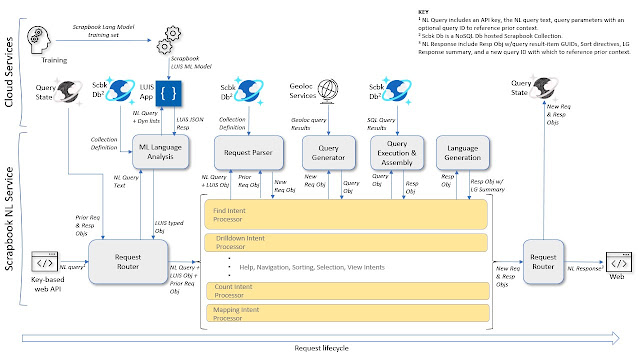
Scrapbook Platform - NL Query Engine Diagram
An architectural diagram showing NL processing in an information management system.


This is a diagram of our NL QueryEngine service. It illustrates how we process natural language queries (questions posed in plain English) that are passed into the QueryEngine API from our Scrapbook web application or bot service applications (MS Teams, Alexa). The QueryEngine service generates the appropriate actions and SQL language queries to return results requested from the user’s Scrapbook collection.

The diagram reads from left to right. At left, our API accepts an NL query object which includes the user’s request as natural language text (NL Query), an application key and other parameters. The NL query text is routed to the LUIS cognitive service app for evaluation against our ML trained language model to extract the relevant ‘intents’ and ‘entities’ that we’ve prepared our model to recognize and which we use to identify an action and to construct an appropriate SQL database query.

Depending on the inferred ‘intent’, NL Query processing is routed via a specific processing pipeline (labeled above as Intent Processors). Each NL query follows a similar process flow – Starting from the Request Router, ML language analysis, routing, request parsing, query generation, query execution, language generation (summarizing the query as interpreted and the results found), and finally back to the Request Router which assembles and returns a response. Query State allows for contextual or ‘follow-on’ queries.

Various Azure cloud services including LUIS and Cosmos DB are utilized in the processing pipeline (as seen in the upper part of the diagram.)


What are we writing about and why are we writing about it?

This post is about our work on a Natural Language (NL) parser for an Information Management Platform we developed called Scrapbook. We've covered Scrapbook in several previous posts (2017 introduction, 2019 our memex, 2021 user scenarios) and we continue in this post with a focus on how we deal with NL queries. By “NL query”, we mean a question or request posed in ordinary plain language as you would to another person. Users interact with the Scrapbook platform through any of various bot channels including MS Teams and Alexa, or via our Scrapbook web application. For example: “Tell me about walks we did in Greece last summer with Mary.”


How did we end up using NL in Scrapbook?

There were two major impetuses that drove our implementation of NL, the first of which emerged organically in our implementation of a bot service as a means to access the Scrapbook platform via chat experiences such as Alexa, MS Teams, Skype, and Messenger. These experiences all intrinsically imply some level of NL interaction, the most typical implementation of which is an interrogative or a “waterfall” style dialog. An example:

"What can I help you with?" => "I'm looking for books."
"In what date range?" => "In 2015."
"Title word?" => "science"

We felt this would be cumbersome as the Scrapbook data model allows for many dimensions, and the data itself spans a broad range of possible information domains. Forcing the user through a chain of questions to probe these dimensions is unwieldy and at best, tedious for the user. We sought a more conversational and fluid ‘natural language’ user experience: "Show me books I read in 2015 with science in the title".

In order to achieve this, we architected a query processing ‘engine’ that allows us to handle free-form user queries against the depth and breadth of Scrapbook’s collections and data models. We’ll explain later how this works.

The second major phase of NL query processing development was driven by our realization that the work we were doing with bots could be more broadly applied to Scrapbook searching in general, regardless of the app, and in particular, from our web application. This created an opportunity to completely separate the NL processing logic from the bot code within which it was originally developed, and to generalize it as a web service that can be called from any Scrapbook user experience whether via a bot channel, web app, mobile, or other.

We understood that as our data model and data itself became richer and more complex, it would be increasingly challenging and expensive to build and maintain forms-based query interfaces within the application. A further challenge was ensuring that the search experience remained intuitive and efficient to use. Forms-based query interfaces may be implemented as single or multiple search boxes with dropdowns and other standard controls to refine the search. These controls remain available in our Scrapbook web application. However, we found that the NL processing and query generation capability that we were implementing in the bot service had already begun to exceed that of our forms-based queries in the app, and was at once more powerful, faster and easier to use.

So, we added an NL query option in the Scrapbook web application that called our newly generalized NL Query Engine, now exposed as a web service. Natural Language querying became almost immediately the go-to search experience in Scrapbook and has continued to evolve in both capability and robustness.


The NL Query Engine, how does it work?

Referring back to the diagram above, the first step in the NL Query Engine processing chain is ML (Machine Learning) Language Analysis, which is called from the Request Router and leverages Microsoft’s LUIS (Language Understanding Intelligence Service) in Azure.

The LUIS service accepts a training model, which is essentially a structured document containing a large number of labeled utterances (sample NL phrases) that we anticipate receiving and that we want our application to recognize and handle intelligently. To enhance ML training and to boost recognition performance, we associate a combination of machine learned, built-in, static and dynamic features, as well as sentence patterns. Once the ML training has been completed and verified, a Scrapbook ML ‘app’ is published on LUIS as a service that we call from our NL Query Engine to analyze Scrapbook user input. We perform this training and publishing process iteratively, both to introduce new functionality as well as to improve recognition performance. The Scrapbook LUIS ML app returns a JSON object which contains the intent and a set of entity features inferred from the input phrase. Depending on the returned LUIS intent and query context, the Request Router directs program flow to the appropriate ‘Intent Processor.’

The business logic within each Intent Processor may differ, but the query processing flow is always the same, passing next to the Request Parser, then to the Query Generator, Query Execution, and finally back to the Request Router.

The Request Parser accepts a LUIS object containing the intent and entities identified in the user’s NL query, a Collection Definition object enumerating the specific categories, subcategories and synonyms associated with the Scrapbook collection being queried, and optionally, a prior Request Object that we use to facilitate contextual parsing. The Request Parser extracts and builds what we call a Request Object. The Request Object holds all of the query terms and parameters that are needed to generate the actual database query. These include category, subcategory, date-time, location, field, text string, negation, sorting, and various selection parameters.

The query, “Show me wines from France in 2018 with a rating of at least 3” for example, is routed after ML Language Analysis to the ‘Find Intent ‘processor from which the Request Parser extracts the following elements and parameters:
  • Category: ‘drink’
  • Subcategory: ‘wine’
  • Geolocation: ‘({location: france}, {type: countryRegion})’
  • DateRange: ‘({1/1/2018 12:00:00 AM}, {1/1/2019 12:00:00 AM})’
  • QueryTerm: ‘with’
  • Field: ‘rating’
  • Text: ‘at least 3’

The next step in the pipeline is the Query Generator that then transforms the parsed query elements and parameters from the Request Object into a set of SQL language query fragments held in a Query Object. Continuing with our example:
  • Category: AND ( STRINGEQUALS(c.category, "Drink", true) )
  • Subcategory: AND ( (RegexMatch(c.bodyObj["type"], "^(|.*,)(|\\s)wine(,.*|)$", "i")) )
  • GeoLocation: AND ST_WITHIN(c.geoLocation, {"type":"MultiPolygon","coordinates":[[[[…]]]] } )
  • DateRange: AND ( c.itemDate >= "2018-01-01T00:00:00" AND c.itemDate < "2019-01-01T00:00:00" )
  • SearchString: AND StringToNumber(c.bodyObj["rating"]) >= 3

We assemble the SQL fragments into one or more SQL query requests that are run against the appropriate Scrapbook collection hosted in an Azure Cosmos database. Other intent processing pipelines may perform other actions.

We generate natural language fragments along the way that ‘restate’ the query as it was interpreted by our processing, and once the query has been executed, we summarize the results returned from the database whether successful or not. “Here are the 6 items found in category Drink of type Wine within France between 2018 and 2019 with a rating >= 3.”

The Intent Processor returns control to the Request Router along with the new Request and Response objects.

Finally, the Request Router saves the Request and Response objects to state memory as context for possible follow-on queries, and returns the results to the calling application as an NL Response object.


So to recap, how do we search for information in Scrapbook?

Users have two options:

  • Natural Language requests (default) – submitted from our Scrapbook web application, a web bot, or other channels including Alexa and MS Teams – are translated as described above by our NL Query Engine into SQL queries, which are run against the active Scrapbook collection stored in Cosmos DB. Search results are presented according to the application or channel. For an Alexa Spot device for example, the results are spoken. Requests such as to switch collections, change views, select a specific result, explore relationships or to ask for help are also supported via natural language.
  • Form-based searches – as is common in many web or console applications – are translated into LINQ queries which are run against the active Scrapbook collection stored in Cosmos DB (LINQ is a programming model abstraction for querying data. The LINQ syntax is translated behind the scenes into SQL by the Cosmos DB API.)
Some example user queries and resulting SQL expressions are shown below.

Background

This section describes some of the terms and components we use in the Scrapbook Query Engine service.


What is natural language processing (NLP)?
  • NLP is what computers need to do to interpret human language, how to process natural language into a meaningful action or result.
  • For example, in Scrapbook we can ask "Show me hikes we did in 2016 near Cortina d'Ampezzo". NLP is the interpretation and processing of this sentence to return a set of results that satisfy the user’s question.
  • Equally important, Scrapbook generates a natural language response describing what it did and what it found, in language easily understood by the user whether displayed or spoken.

What is Language Understanding (LUIS)?
  • Azure LUIS is a cloud-based conversational AI service that applies custom machine-learning intelligence to a user's conversational, natural language text (called an ‘utterance’) to predict and score an overall intent, and to extract and label relevant, detailed information within the text.
  • An utterance is textual or spoken input from the user, the user’s question or query.
    • In Scrapbook for example, an utterance might be "Show me album covers from the 1980s with the keyword ‘hair’."
  • We create an ‘application’ in LUIS by defining a model. Within the model we identity the features we want to recognize. There are two principal feature categories - intent and entity.
  • An intent may be a task or action that the user wants to perform.
    • For example, in Scrapbook, our intents are "find", "drilldown", "map", "count", “related”, “collections”, “sort”, "help", "debug", "select", among others.
    • In the query "What are lunches we’ve had nearby that we’ve rated at least 4?", the intent is "find".
    • Our Scrapbook ML model currently distinguishes 18 intents.
  • Entities are specific features that we train our LUIS application recognize within the utterance, akin to the parts of a sentence.
    • In the query "Show me wines we had from Italy last year with the variety primitivo", the entities we recognize are "datetime (last year)", "geography (Italy)", "category (drink)", "subcategory (wine)", "field (variety)", and "text (primitivo)".
    • Our ML model entities include category, subcategory, text, number, dimension, ordinal, parameter, query type (with, by, …), nearby, location, geolocation, datetime, and query object (when not a category).
    • We currently recognize 19 entities and roles.
  • Our Scrapbook ML model in LUIS uses a combination of built-in entities such as DateTime, machine-learned entities such as location or text, fixed lists, and dynamic lists. Category and SubCategory are examples of dynamic-list entities that we pass into the model via the API with the utterance. We do this because each Scrapbook collection has its own category definitions. This strategy allows us to achieve excellent category entity recognition across multiple collections. For examples of different collections, see the post 2021 user scenarios.
  • We refine our LUIS ML model by adding or modifying training utterances, patterns and lists in a language understanding (.lu) format file which once uploaded to our LUIS Conversation App in Azure, is used to train a new instance of our model. Once the updated model passes acceptance testing, we publish it into production.

What is Azure Cosmos DB?
  • Cosmos DB is a managed NoSQL database service that stores documents in collections that can be queried using standard SQL query language syntax. Each "item" in a Scrapbook collection is stored as a Cosmos DB document.
  • Cosmos DB is a schema-free database, which means we structure or model the data as we need for the domain of the collection it represents (see the data model),
  • Structure Query Language (SQL) queries are how we query our collections in Cosmos DB

What is the Scrapbook data model?
  • Platform / Collection / Item
    • Scrapbook collections are maintained in distinct Cosmos DB database collections.
    • A Scrapbook item is stored as a Cosmos DB document within a collection.
    • The Scrapbook platform supports one or more collections.
    • A Scrapbook collection has one or more items. For reference, our collections have thousands of items.
  • Item / Category / Subcategory (or type) & Fields
    • Scrapbook items have mandatory id, datetime, and category fields. All other fields are optional depending on the category definition. Items are organized principally by category.
    • Each category may have one or more subcategories and synonyms to enhance collection organization, flexibility and querability. For example, Category ‘activity’ might have ‘run’ as a subcategory, and ‘jogging’ as a synonym for ‘run’.
    • Each category has an associated set of fields that further define it. The category ‘book’ for example, would have an author field, which might not be used in other categories.

User Query Examples

In this section, we show an NL query and the final SQL that is run against Cosmos DB. Other examples with visual results are shown in our post 2021 user scenarios. These queries were run against our MyJournal collection which has categories that support these queries. Geolocation related polygons are shortened with ellipsis (…) here.
 

"Show me hikes"

SELECT  c.id, c.itemDate FROM c  

WHERE c.type = "scrapbookItem 

AND  ( STRINGEQUALS(c.category, "Activity", true) )   

AND  ( ( RegexMatch(c.bodyObj["type"], "^(|.*,)(|\\s)hike(,.*|)$", "i") ) 

ORDER BY c.itemDate DESC 


"Tell me about trips we took last year in Lombardy, Italy"

SELECT  c.id, c.itemDate FROM c  

WHERE c.type = "scrapbookItem 

AND  ( STRINGEQUALS(c.category, "Travel", true) )   

AND  (c.itemDate >= "2020-01-01T00:00:00" AND c.itemDate < "2021-01-01T00:00:00")   

AND  ST_WITHIN(c.geoLocation, {"type":"Polygon","coordinates":[[[9.2592,44.6784], …, [9.2592,44.6784]]]})  

ORDER BY c.itemDate DESC 


"Show me wines rated greater than 3 from France"
  • followed by “What about red wines?”
  • followed by “What about from Napa Valley?”

SELECT  c.id, c.itemDate FROM c  

WHERE c.type = "scrapbookItem 

AND  ( STRINGEQUALS(c.category, "Drink", true) )   

AND  ( ( RegexMatch(c.bodyObj["type"], "^(|.*,)(|\\s)wine(,.*|)$", "i") ) )   

AND  StringToNumber(c.bodyObj["rating"]) > 3   

AND  ST_WITHIN(c.geoLocation, {"type":"Polygon","coordinates":[[[2.65916,42.34262] …, [2.65916,42.34262]]]})  

ORDER BY c.itemDate DESC 


SELECT  c.id, c.itemDate FROM c  

WHERE c.type = "scrapbookItem 

AND  ( STRINGEQUALS(c.category, "Drink", true) )   

AND  ( ( RegexMatch(c.bodyObj["type"], "^(|.*,)(|\\s)red(,.*|)$", "i") ) )   

AND  StringToNumber(c.bodyObj["rating"]) > 3   

AND  ST_WITHIN(c.geoLocation, {"type":"Polygon","coordinates":[[[2.65916,42.34262] …, 

[2.65916,42.34262]]]})  

ORDER BY c.itemDate DESC 


SELECT  c.id, c.itemDate FROM c  

WHERE c.type = "scrapbookItem 

AND  ( STRINGEQUALS(c.category, "Drink", true) )   

AND  ( ( RegexMatch(c.bodyObj["type"], "^(|.*,)(|\\s)red(,.*|)$", "i") ) )  AND  StringToNumber(c.bodyObj["rating"]) > 3   

AND  ST_WITHIN(c.geoLocation, {"type":"Polygon","coordinates":[[[-122.29542286330422,38.26322398466052],[-122.29542286330422,38.25549854951917],[-122.28230540818015,38.25549854951917],[-122.28230540818015,38.26322398466052],[-122.29542286330422,38.26322398466052]]]})  

ORDER BY c.itemDate DESC 


"Show me items within 100 meters except museums"

SELECT  c.id, c.itemDate FROM c  

WHERE c.type = "scrapbookItem"   

AND NOT  ( ( RegexMatch(c.bodyObj["type"], "^(|.*,)(|\\s)museum(,.*|)$", "i")  

AND IS_DEFINED(c.bodyObj["type"])) )   

AND  ( ST_DISTANCE(c.geoLocation, {'type': 'Point', 'coordinates':[current lon, lat]}) < 100 )  

ORDER BY c.itemDate DESC  


"How many books did I read this year"
  • followed by "Show me a list"

SELECT VALUE COUNT(1) FROM c  

WHERE c.type = "scrapbookItem 

AND  ( STRINGEQUALS(c.category, "Book", true) )   

AND  (c.itemDate >= "2022-01-01T00:00:00" AND c.itemDate < "2023-01-01T00:00:00")   


SELECT  c.id, c.itemDate FROM c  

WHERE c.type = "scrapbookItem 

AND  ( STRINGEQUALS(c.category, "Book", true) )   

AND  (c.itemDate >= "2022-01-01T00:00:00" AND c.itemDate < "2023-01-01T00:00:00")  

ORDER BY c.itemDate ASC  


"Show me hikes last year except with Roberto"
  • followed by "Show me a map"

SELECT  c.id, c.itemDate FROM c  

WHERE c.type = "scrapbookItem 

AND  ( STRINGEQUALS(c.category, "Activity", true) )   

AND  ( ( RegexMatch(c.bodyObj["type"], "^(|.*,)(|\\s)hike(,.*|)$", "i") ) )   

AND  (c.itemDate >= "2021-01-01T00:00:00" AND c.itemDate < "2022-01-01T00:00:00")   

AND NOT (CONTAINS(c.bodyObj["who"], "roberto", true) AND IS_DEFINED(c.bodyObj["who"]))  )  

ORDER BY c.itemDate DESC  


“Show me a map” results in a ‘map’ intent which we interpret as a command to display a map of results.


"Find me books of type reference"

Here's the SQL from the NL query:

SELECT  c.id, c.itemDate FROM c  

WHERE c.type = "scrapbookItem 

AND  ( STRINGEQUALS(c.category, "Book", true) )   

AND  ( ( RegexMatch(c.bodyObj["type"], "^(|.*,)(|\\s)reference(,.*|)$", "i") ) 

ORDER BY c.itemDate DESC  


In the Scrapbook web application, we can also search via form-based web controls which generate a LINQ query that in turn translates into the following similar SQL:

SELECT VALUE root FROM root  

WHERE (((true AND CONTAINS(LOWER(root["bodyObj"]["type"]), "reference"))  

AND (LOWER(root["category"]) = "book"))  

AND (root["type"] = "scrapbookItem"))  

ORDER BY root["itemDate"] DESC