Saturday, March 26, 2011

The Aurora Bridge Mural, Fremont and Graffiti

The Aurora Street Mural

The mural on N. 38th Street at Bridge Way under Aurora (location) is officially called the Aurora Bridge Mural (see photo of plaque below). We never knew what it was called until we walked up close to it and went back and forth over the surface to find the plaque which is located up high on the west end of the mural. The mural was created by Patrick Gabriel in 1996 and painted in 1997.

The mural has been restored (according to our memory) at least a few times since 1997 to clean up graffiti. It is now again starting to accumlate graffiti again in the form of “tagging”. From the highlights of a 2010 Graffiti Report conducted in Seattle, graffiti tags are defined as:

…simple names or symbols, often written in a stylized manner found in high volumes and in high-visible locations. Tags range from small single-color marks to large elaborate “pieces” in multiple colors and bubble-lettering. Seattle officials indicate that “tagging” is the City’s most common graffiti.
The full report cites statistics from the Portland Police Department that indicate that tagging accounted for 80% of the graffiti in Portland and goes on to give a less than flattering portrait of a tagger. He (and it is a he) is caucasian, educated and computer literate. He has an addictive personality, a chemical dependency, and is prone to violent behavior.

For more on graffiti in Fremont and past efforts to restore the 38th Street Mural, see FremontUniverse. For a little insight on sticker graffiti, see the MyBallard blog. On a related note, we were surprised to see that Aurora – the street - has its own web site with the tag line “Stories from Seattle’s Favorite Street.” Really, Seattle’s favorite street? According to the the full report cited above, parts of Aurora are definitely a hotspot for graffiti – see hotspot image.

Seattle Graffiti Hotspot Map (ref)
Seattle Graffiti Hotspot Map

Views of the Aurora Street Mural


Aurora Street Mural Plaque

Sunday, March 13, 2011

Io non ho paura – la musica

Io non ho paura - book cover frontIo non ho paura - book cover back 

We have been reading Io non ho paura (I’m Not Scared) by Niccolò Ammaniti in our Italian class at Three Things Italian and there are several pieces of music that are used in the story that we wanted to mention here. First, some background on the story. Ammaniti published the book in 2001 and it was made into a movie released in 2003. The story takes place during Italy’s anni di piombo (years of lead) which were a period of social and political turmoil in Italy from the late 1960s to the early 1980s. The turmoil was marked, in particular, by kidnappings, including the kidnapping and assassination of Aldo Moro. With this as background, the story is set in 1978 and involves a kidnapping of the young son of a rich northern family. The kidnapped boy is kept in a hole somewhere in the south of Italy and it’s upon this hole the main character Michele Amitrano stumbles. As the story unfolds Michele finds out why the boy is in the hole and who is involved. 

The musical references include: 

Chapter 4. A snippet from Verdi’s La traviata. While Michele’s mother is spanking him, La traviata is playing on the radio. Italian: "Croce. Croce e delizia. Delizia al cor..." English: “Torment. Torment and delight of my heart…” 

Chapter 5. The song Bello Ciao is an Italian partisan song of World War II is sung by Barbara as she approaches the carob tree where Michele is hiding. "O partigiano, portami via, che mi devon seppellir. O partigiano, portami via. O bella ciao ciao ciao". English: "Oh partisan carry me away, because they must bury me. Oh partisan, carry me away. Oh goodbye beautiful, bye, bye." Michele has taken refuge in the tree because he did not want to share his bedroom with Sergio, a visitor to his home. The song reflects Michele rebelling against authority, his parents. 

Mina’s Parole, Parole, Parole where we find the not so nice Felice Natale (yes, that’s his name) singing it at the abandoned house where the kidnapped boy is hidden. Italian: "Tu sei come il vento che porta i violini e le rose. Parole, parole, parole. Ascoltami. Parole, parole, parole. Ti prego." English: “You are like the wind that brings violins and roses. Word, words, words. Listen to me. Words, words, words. I beg you.” We’ve always had a thing for Mina here at Travelmarx: Mina, Mina, Mina; Back to Mina, E Poi Mina, Bula Bula, and Carosello – Italian Ads. The use of the song here foreshadows the discovery by Michele that his parents' advice is hollow in terms of whom they say are the people in the world you have to watch out for. 

Chapter 6. Lucio Battisti’s Con il nastro rosa. In this scene Michele’s mamma, Teresa Amitrano, singing to herself in one of her few worry-free moments. Italian: "Inseguendo una libellula in un prato, un giorno che avevo rotto col passato." English: “Chasing a dragonfly in a meadow, a day that I had broken with the past.” By the end of the story, the past will creep up on Teresa. A nursery rhyme (filastrocca) about the cuckoo of Northern Italy that the tormented Felice sings as he catches Michele with the kidnapped boy. "L'inverno è passato, l'aprile non c'e più, e ritornato è maggio al canto del cucù, cu-cù, cu-cù, l'aprile non c'è più, e ritornato è maggio al canto del cucù." A nonliteral but phonetically better sounding translation is “The winter now is over, And April rains are gone. It’s May again, I know, For I hear the cuckoo’s song.” 

Chapter 10. Paolo Conte’s Onda su onda. In this scene, Melichetti, a farmer, is singing the song late at night watched by Michele from the darkness. Italian: "Che acqua gelida qua, nessuno piú mi salverà. Son caduto dalla nave, son caduto, mentre a bordo c’era il ballo. Onda su onda…" English: “What freezing cold water here, no one will save me at all. I fell off the boat, I fell while on board there was a dance.” The song literally describes Michele's situation, out in the dark of night trying to find his way as he attempts to free the kidnapped boy. Michele was also figuratively thrown overboard from the ship that was his innocent youth.

Windows and IE Pinned Sites Functionality – For Sites That Don’t Enable The Functionality

Update 2023-12-19:  For the Edge browser, you simply go to the site (in a browser tab in Edge), select ".../More Tools/Pin to Taskbar". It seems to work for all sites.

Update 2013-04-14:  I just tried this with IE10 and Windows 8 and the steps shown here still work.
The Pinned Sites integration between Internet Explorer 9 and Windows 7 can be a time saver for sites you go to often. The goal of this post is to show one way of getting Windows 7 and IE9 Pinned Site functionality for a site that doesn’t implement the functionality.

The idea behind pinned sites is that you browse to a site in IE9, tear off the site, and attach it to the task bar in Windows 7. If the site implements special meta elements or implements some IE9-specific JavaScript then you get a richer taskbar item. For example, Facebook pinned to the task bar looks like this:

Facebook Pinned Site

Similarly, Amazon pinned to the taskbar looks like this:

Amazon Pinned Site

But what if the site you want to pin doesn’t implement the meta elements or the IE9-specific JavaScript? Or, you want to create your own customization of a pinned site? When we first read about the pinned sites functionality, we immediately thought that it would be cool for Windows 7 users to create their own pinned site customizations. But, on closer inspection we learned that the functionality is really targeted at web site owners allowing a richer experience for their users. But, with a little work you can customize a site that has pinned functionality built in or create pinned functionality for a site that doesn’t implement it. We’ll consider the latter case in this post. For example, at the time of writing, the Wikipedia site does not implement the pinned site functionality. If you browse to Wikipedia and pin the site you end up with the generic implementation of a pinned site that looks like this:

Wikipedia Pinned Site - Generic

With the simple trick shown here, you’ll be able to create a Wikipedia pinned site that is customized and looks like this:

Wikipedia Pinned Site Customization

The trick we’ll employ here is to use Fiddler, a web debugging proxy tool, to insert meta elements and custom JavaScript before rendering the page in the browser. Download Fiddler if you don’t already have it.

Before getting started, take a look at the developer documentation to understand how the meta elements and IE9-specific JavaScript are specified. Notice how in the Amazon pinned site image shown above there are “favorites” and “tasks” categories. The items in the “tasks” categories are created with a meta element like this (broken into several lines to make it readable):
<meta
name='msapplication-task'
content='name=Login - English;
action-uri=http://en.wikipedia.org/w/index.php?title=Special:UserLogin&returnto=Main_Page;
icon-uri=http://www.wikipedia.org/favicon.ico'/>


The items in the “favorites” categories (called a jumplist) are created programmatically with JavaScript code like this:

window.external.msSiteModeAddJumpListItem(
'Wikiquote','http://en.wikiquote.org/wiki/Main-Page',
'http://en.wikiquote.org/favicon.ico');


The steps for creating pinned site functionality for Wikipedia are:

1. Start Fiddler.

2. Customize the Rules.js for Fiddler

Fiddler Rules

3. Find the OnBeforeResponse(oSession: Session) function in Rules.js and after the last if statement add the code below. The JavaScript snippet below can be downloaded from here.

// Wikipedia Pinned Site Customization
if ((oSession.oResponse.headers.ExistsAndContains("Content-Type", "html")) &&
(oSession.HostnameIs("www.wikipedia.org"))) {
// Remove any compression or chunking
oSession.utilDecodeResponse();
var oBody = System.Text.Encoding.UTF8.GetString(oSession.responseBodyBytes);

// Add our metadata tags and JavaScript
var oRegEx = /<head>/i;
var extraMetaData = "<head>\r"
extraMetaData += "<meta name='msapplication-task' content='name=Login - English;action-uri=http://en.wikipedia.org/w/index.php?title=Special:UserLogin&returnto=Main_Page;icon-uri=http://www.wikipedia.org/favicon.ico'/>";
extraMetaData += "<meta name='msapplication-task' content='name=Entra - Italiano;action-uri=http://www.wikipedia.org/w/index.php?title=Speciale:Entra&returnto=Pagina_principale;icon-uri=http://www.wikipedia.org/favicon.ico'/>";
var extraScript = "<script type='text/javascript'>" +
"try {" +
"window.external.msSiteModeCreateJumplist('Wikipedia Favorites');" +
"window.external.msSiteModeAddJumpListItem('Wikiquote','http://en.wikiquote.org/wiki/Main-Page','http://en.wikiquote.org/favicon.ico');" +
"window.external.msSiteModeAddJumpListItem('Wikinews', 'http://en.wikinews.org/wiki/Main_Page', 'http://en.wikinews.org/favicon.ico');" +
"window.external.msSiteModeAddJumpListItem('Wikisource','http://en.wikisource.org/wiki/Main-Page', 'http://en.wikisource.org/favicon.ico');" +
"window.external.msSiteModeAddJumpListItem('Wikispecies','http://en.wikispecies.org/wiki/Main-Page', 'http://species.wikimedia.org/favicon.ico');" +
"window.external.msSiteModeAddJumpListItem('Wikiversity','http://en.wikiversity.org/wiki/Wikiversity', 'http://en.wikiversity.org/favicon.ico');" +
"window.external.msSiteModeAddJumpListItem('Wikipedia - Italiano','http://it.wikipedia.org/wiki/Pagina_principale', 'http://it.wikipedia.org/favicon.ico');" +
"} catch (ex) {} <\/script>";
oBody = oBody.replace(oRegEx, extraMetaData + extraScript);

// Set the response body with the changes
oSession.utilSetResponseBody(oBody);
}


4. Save the rules so Fiddler can pick up the changes you made.

5. Make sure you are capturing web traffic (see the bottom left corner of Fiddler).

6. Open Internet Explorer and go to http://www.wikipedia.org/, with Fiddler running and capturing traffic. Hit CTRL + F5 to make sure you get a fresh page and not a cached page.

7. Pin the site to the Windows 7 taskbar and you should have the Wikipedia pinned site customized as shown above.

8. After you have created the pinned site, remove the code from Fiddler’s custom rules because you don’t need it anymore.

What the snippet of JavaScript code does is search for the head element of the page and right before it is rendered in the browser it adds the meta elements and IE9-specific JavaScript. Fiddler provides the option with the OnBeforeResponse function to do this work right before the page is rendered to the browser.

Where are pinned sites kept in Windows 7? Pinned site are here:
C:\Users\[USER]\AppData\Local\Microsoft\Internet Explorer\Pinned Sites.

Wednesday, March 9, 2011

C++ Console Application to Get Comments from a Microsoft Word File

Update 2019-02-19:  Many thanks to Brian Thomas @ Kutana Software for helping getting this run. The C++ project is on Github at https://github.com/travelmarx/travelmarx-blog/tree/master/ExtractComments.

Update 2019-02-11:  Based on a comment received (see below), we reviewed this code and found a number of problems.

  1. That the presentation of the code below is bad having been escaped poorly when inserted.
  2. The code itself (when corrected for escape problems) when put into VS 2017 gave a number of syntax errors.
  3. The status of OPC has changed such that getting the C++ project to build in VS wasn't obvious. Our trouble was around getting the right System.IO.Packaging and WindowsBase references - we think. Some of the original SDK Samples for Windows 7 are in Github here.
What to do? First, here is the code on Github that was intended. This addressed problems 1 and 2. We made some slight changes to the code to remove syntax errors (using SysAllocString in several spots) as well as changing stdafx.h to pch.h. The name of the precompiled library isn't fixed, just that for C++ console apps in VS 2017, pch.h was used.

For problem 3, we are working on a possible solution (see update above). If you  are interested in running extracting comments using .NET (C# and VB), see How to: Retrieve comments from a word processing document (Open XML SDK).

Begin Initial Post

Output from Comment Extraction

The goal of this post is to show how to construct a C++ console application that will extract comments from a Word document. This post builds on a previous post which showed extracting comments from a Microsoft Word document (2007 or greater). In the previous post, Getting Comments from a Microsoft Word File: Leveraging the OPC Format, we did the extraction by changing the extension of the Word document and accessing the files directly in the ZIP structure. In this post, we take the Word document as is and use a console application written in C++/COM and leveraging the OPC API to directly access the comments. The code shown here was run in Visual Studio 2010 on Windows 7.

The key to the console application logic is to understand the document parts of the Word XML format. When we crack open the Word ZIP file we could get the comments file directly. Using the API we have to follow the pattern set out in the API. The pattern for a Word document is discussed here on MSDN and here. The main document part (../word/document.xml) is the main part in the package and that the comments part (../word/comments.xml) has a relationship to the main document part that can be used to obtain the coments. On our first try, we kept trying to get the comments part directly from the package relationships which didn't work. However, once we got the document part from the package (see the FindPartByRelationshipType method in the program below), we then could use the same logic to get the comments part from the document part.

A crucial part of the console application are the definitions of content types and relationship types of parts to parts. These definitions are defined in the header file (ExtractComments.h) for this application. For example, the content type of the comments part is:

application/vnd.openxmlformats-officedocument.wordprocessingml.comments+xml

The relationship of the comments part to the document part:

http://schemas.openxmlformats.org/officeDocument/2006/relationships/comments

Note: In this console application we did not deal with the fact that comments in a Word document can contain more than just text. In the previous post we did deal with hyperlinks as example of content besides text in comments. These improvements to this code would need to be added here. Specifically, if you look at the ECMA-376 part1 for the docx format, you can find the details of what a comment can contain and it includes charts, diagrams, hyperlinks, images, video, and embedded content.

The code shown here was build starting from the SDK samples provides with the OPC SDK Samples for Windows 7. In particular we started from the SetAuthor project inside of the AllOPCSamples.zip. We changed the SetAuthor program to suit our purpose here. The console application takes a file name as an argument. In Visual Studio, set the file name under the configuration properties of the project as shown below.

Visual Studio Console App Configuration

The code is shown below and as well as links for downloading it. Before getting to the code here is a sketch of the pseudo-logic of the code. We use the syntax of (x,y) -> z to mean x and y are used to return z. A bit simplistic, but helps clarify what is coming in and what is going out.
//pseudo-code
wmain
    COM Initilization of Thread
    CoCreateInstance of Opc Factory : () -> factory
    Load Package : (factory, fileName) -> package
    Find Document Part in Package : (package) -> documentPart
    Find Comments Part in Package : (package, documentPart) -> commentsPart
    Print Core Properties (package) -> output
    Print Comments (commentsPart) -> output

Load Package
(factory, fileName) -> package
    Create Stream on File : (factory, fileName, options) -> sourceFileStream
    Read Package from Stream : (factory, sourceFileStram, options) -> package

Find Document In Package
(package) -> documentPart
    relationshipType = http://schemas.openxmlformats.org/officeDocument/2006/relationships/officeDocument
    contentType = application/vnd.openxmlformats-officedocument.wordprocessingml.document.main+xml
    Find Part by Relationship Type : (package, NULL, relationshipType, contentType) -> documentPart

Find Core Properties Part
(package) -> documentPart
    relationshipType = http://schemas.openxmlformats.org/package/2006/relationships/metadata/core-properties
    contentType = application/vnd.openxmlformats-package.core-properties+xml
    Find Part by Relationship Type : (package, NULL, relationshipType, contentType) -> documentPart

Find Comments in Package
(package, documentPart) -> commentsPart
    relationshipType = http://schemas.openxmlformats.org/officeDocument/2006/relationships/comments
    contentType = application/vnd.openxmlformats-officedocument.wordprocessingml.comments+xml
    Find Part by Relationship Type* : (package, documentPart, relationshipType, contentType) -> commentsPart

Find Part By Relationship Type
(package, parentPart, relationshipType, contentType) -> part
    Get Part Set : (package) -> partSet
    Get Relationship Set
    if (parentPart == NULL) then (package) -> packageRels
    else (parentPart) -> packageRels
    Get Enumerator for Type : (packageRels, relationshipType) -> packeRelsEnum
    Get Current : (packageRelsEnum) -> currentRel
    Resolve Target Uri to Part : (currentRel) -> partUri
    Part Exists : (partSet, partUri) -> partExists
    if (partExists) {
        Get Current Part : (partSet, partUri) -> currentPart
        Get Current Part Content Type : (currentPart) -> currentContentType
        if (currentContentType equals contentType)
        { // found the part }
    }

Resolve Target URI to Part
(relationship) -> resolvedUri

Print Comments
(commentsPart) -> output
    Get DOM from Part : (commentsParts, namespace) -> commentsDom
    Select Nodes : (commentsDom) -> commentsNodeList
    for each {
        Get Attributes of Comment Node
          Get Text of Comment Node
    }

Get Text of Comment Node
(node) -> output

Get Attributes of Comment Node
(node) -> output

Print Core Properties
(package) -> output
    Find Core Properties : (package) -> corePropertiesPart
    Get DOM from Part : (corePropertiesPart, namespace) -> corePropertiesDom
    Select Single Node : (corePropertiesDom, nodeName) -> nodeFound
    // work with nodeFound

Get DOM from Part
(part, namespace) -> XmlDocument


The header file for the console application can be downloaded here and is shown below.
#include "msopc.h"
#include "msxml6.h"
#include "stdafx.h"

HRESULT LoadPackage(IOpcFactory *factory, LPCWSTR packageName, IOpcPackage **outPackage);
HRESULT FindDocumentInPackage(IOpcPackage *package, IOpcPart  **documentPart);
HRESULT FindCommentsInPackage(IOpcPackage *package, IOpcPart  *parentPart, IOpcPart  **documentPart);
HRESULT FindPartByRelationshipType(IOpcPackage *package, IOpcPart *parentPart, LPCWSTR relationshipType, LPCWSTR contentType, IOpcPart **part);
HRESULT ResolveTargetUriToPart(IOpcRelationship *relativeUri, IOpcPartUri **resolvedUri);
HRESULT PrintCoreProperties(IOpcPackage *package);
HRESULT PrintComments(IOpcPart *part);
HRESULT GetAttributesOfCommentNode(IXMLDOMNode *node);
HRESULT GetTextofCommentNode(IXMLDOMNode *node);
HRESULT FindCorePropertiesPart(IOpcPackage *package, IOpcPart **part);
HRESULT DOMFromPart(IOpcPart *part, LPCWSTR selectionNamespaces, IXMLDOMDocument2 **document);

static const WCHAR g_officeDocumentRelationshipType[] =
    L"http://schemas.openxmlformats.org/officeDocument/2006/relationships/officeDocument";
static const WCHAR g_wordProcessingContentType[] =
    L"application/vnd.openxmlformats-officedocument.wordprocessingml.document.main+xml";
static const WCHAR g_corePropertiesRelationshipType[] =
    L"http://schemas.openxmlformats.org/package/2006/relationships/metadata/core-properties";
static const WCHAR g_corePropertiesContentType[] =
    L"application/vnd.openxmlformats-package.core-properties+xml";
static const WCHAR g_commentsRelationshipType[] =
 L"http://schemas.openxmlformats.org/officeDocument/2006/relationships/comments";
static const WCHAR g_commentsContentType[] =
 L"application/vnd.openxmlformats-officedocument.wordprocessingml.comments+xml";
static const WCHAR g_corePropertiesSelectionNamespaces[] =
    L"xmlns:cp='http://schemas.openxmlformats.org/package/2006/metadata/core-properties' "
    L"xmlns:dc='http://purl.org/dc/elements/1.1/' "
    L"xmlns:dcterms='http://purl.org/dc/terms/' "
    L"xmlns:dcmitype='http://purl.org/dc/dcmitype/' "
    L"xmlns:xsi='http://www.w3.org/2001/XMLSchema-instance'";
static const WCHAR g_commentsSelectionNamespaces[] =
 L"xmlns:wpc='http://schemas.microsoft.com/office/word/2010/wordprocessingCanvas' "
    L"xmlns:mc='http://schemas.openxmlformats.org/markup-compatibility/2006' "
    L"xmlns:o='urn:schemas-microsoft-com:office:office' "
    L"xmlns:r='http://schemas.openxmlformats.org/officeDocument/2006/relationships' "
    L"xmlns:m='http://schemas.openxmlformats.org/officeDocument/2006/math' "
 L"xmlns:v='urn:schemas-microsoft-com:vml' "
 L"xmlns:wp14='http://schemas.microsoft.com/office/word/2010/wordprocessingDrawing' "
 L"xmlns:wp='http://schemas.openxmlformats.org/drawingml/2006/wordprocessingDrawing' "
 L"xmlns:w10='urn:schemas-microsoft-com:office:word' "
    L"xmlns:w='http://schemas.openxmlformats.org/wordprocessingml/2006/main' "
 L"xmlns:w14='http://schemas.microsoft.com/office/word/2010/wordml' "
 L"xmlns:wpg='http://schemas.microsoft.com/office/word/2010/wordprocessingGroup' "
 L"xmlns:wpi='http://schemas.microsoft.com/office/word/2010/wordprocessingInk' "
 L"xmlns:wne='http://schemas.microsoft.com/office/word/2006/wordml' "
 L"xmlns:wps='http://schemas.microsoft.com/office/word/2010/wordprocessingShape' ";


The main code file for the console application can be download here and is shown below.
// ExtractComments.cpp : Defines the entry point for the console application.

#include "ExtractComments.h"
#include "stdio.h"
#include "windows.h"
#include "shlobj.h"
#include 
#include "util.h"
using namespace std;

int wmain(int argc, wchar_t* argv[])
{
 if (argc != 2)
 {
  wprintf(L"Usage: ExtractComments.exe \n");
  exit(0);
 }
 wprintf(L"Starting.\n");
 LPCWSTR pFileName = argv[1];
 HRESULT hr = CoInitializeEx(NULL, COINIT_MULTITHREADED);

 if (SUCCEEDED(hr))
 {
  IOpcPackage * package = NULL;
  IOpcPart * documentPart = NULL;
  IOpcFactory * factory = NULL;
  hr = CoCreateInstance(
      __uuidof(OpcFactory),
      NULL,
      CLSCTX_INPROC_SERVER,
      __uuidof(IOpcFactory),
      (LPVOID*)&factory
      );
  if (SUCCEEDED(hr))
  {
   wprintf(L"Created factory.\n");
   hr = ::LoadPackage(factory, pFileName, &package);
   // See command arguments in project properties for specification of file to read.
  }
  if (SUCCEEDED(hr))
  {
   wprintf(L"Loaded package.\n");
   hr = ::FindDocumentInPackage(package, &documentPart);

  }
  IOpcPart *commentsPart;
  if (SUCCEEDED(hr))
  {
   wprintf(L"Found document in package.\n");
   hr = ::FindCommentsInPackage(package, documentPart, &commentsPart);
  }
  if (SUCCEEDED(hr))
  {
   wprintf(L"Found comments in package.\n");
   hr = ::PrintCoreProperties(package);
  }
  if (SUCCEEDED(hr))
  {
   wprintf(L"Found core properties in package.\n");
   hr = ::PrintComments(commentsPart);
  }
  if (SUCCEEDED(hr))
  {
   wprintf(L"Found comments in package.\n");
  }

  // Release resources
  if (package)
  {
   package->Release();
   package = NULL;
  }

  if (documentPart)
  {
   documentPart->Release();
   documentPart = NULL;
  }

  if (factory)
  {
   factory->Release();
   factory = NULL;
  }
  CoUninitialize();
 }
 return 0;
}

HRESULT LoadPackage(
 IOpcFactory *factory,
 LPCWSTR packageName,
 IOpcPackage **outPackage)
{
 IStream * sourceFileStream = NULL;
 HRESULT hr = factory->CreateStreamOnFile(
     packageName,
     OPC_STREAM_IO_READ,
     NULL,
     0,
     &sourceFileStream);
 if (SUCCEEDED(hr))
 {
  hr = factory->ReadPackageFromStream(
     sourceFileStream,
     OPC_CACHE_ON_ACCESS,
     outPackage);
 }
 if (sourceFileStream)
 {
  sourceFileStream ->Release();
  sourceFileStream = NULL;
 }
 return hr;
}
HRESULT FindDocumentInPackage(
 IOpcPackage *package,
 IOpcPart   **documentPart)
{
  return ::FindPartByRelationshipType(
  package,
  NULL,
  g_officeDocumentRelationshipType,
  g_wordProcessingContentType,
  documentPart);

}
HRESULT FindCommentsInPackage(
 IOpcPackage *package,
 IOpcPart   *documentPart,
 IOpcPart   **commentsPart)
{
  return ::FindPartByRelationshipType(
  package,
  documentPart,
  g_commentsRelationshipType,
  g_commentsContentType,
  commentsPart);

}
HRESULT FindCorePropertiesPart(
  IOpcPackage * package,
  IOpcPart **part)
{
 return ::FindPartByRelationshipType(
    package,
    NULL,
    g_corePropertiesRelationshipType,
          g_corePropertiesContentType,
    part);
}
HRESULT FindPartByRelationshipType(
 IOpcPackage *package,
 IOpcPart *parentPart,
 LPCWSTR relationshipType,
 LPCWSTR contentType,
 IOpcPart **part)
{
 *part = NULL;
 IOpcRelationshipSet * packageRels = NULL;
 IOpcRelationshipEnumerator * packageRelsEnum = NULL;
 IOpcPartSet * partSet = NULL;
 BOOL hasNext = false;

 HRESULT hr = package->GetPartSet(&partSet);

 if (SUCCEEDED(hr))
 {
  if (parentPart == NULL)
  {
   hr = package->GetRelationshipSet(&packageRels);
  }
  else
  {
   hr = parentPart->GetRelationshipSet(&packageRels);
  }
 }
 if (SUCCEEDED(hr))
 {
  hr = packageRels->GetEnumeratorForType(
    relationshipType,
    &packageRelsEnum);
 }
 if (SUCCEEDED(hr))
 {
  hr = packageRelsEnum->MoveNext(&hasNext);
 }
 while (SUCCEEDED(hr) && hasNext && *part == NULL)
 {
  IOpcPartUri * partUri = NULL;
  IOpcRelationship * currentRel = NULL;
  BOOL partExists = FALSE;

  hr = packageRelsEnum->GetCurrent(¤tRel);
  if (SUCCEEDED(hr))
  {
   hr = ::ResolveTargetUriToPart(currentRel, &partUri);
  }
  if (SUCCEEDED(hr))
  {
   hr = partSet->PartExists(partUri, &partExists);
  }
  if (SUCCEEDED(hr) && partExists)
  {
   LPWSTR currentContentType = NULL;
   IOpcPart * currentPart = NULL;
   hr = partSet->GetPart(partUri, ¤tPart);
   IOpcPartUri * name = NULL;
   currentPart->GetName(&name);
   BSTR displayUri = NULL;
   name->GetDisplayUri(&displayUri);
   wprintf(L"currentPart: %s\n", displayUri);
   if (SUCCEEDED(hr) && contentType != NULL)
   {
    hr = currentPart->GetContentType(¤tContentType);
    wprintf(L"contentType: %s\n", currentContentType);
    if (SUCCEEDED(hr) && 0 == wcscmp(contentType, currentContentType))
    {
     *part = currentPart;  // found what we are looking for
     currentPart = NULL;
    }
   }
   if (SUCCEEDED(hr) && contentType == NULL)
   {
    *part = currentPart;
    currentPart = NULL;
   }
   CoTaskMemFree(static_cast(currentContentType));
   if (currentPart)
   {
    currentPart->Release();
    currentPart = NULL;
   }
  }
  if (SUCCEEDED(hr))
  {
   hr = packageRelsEnum->MoveNext(&hasNext);
  }
  if (partUri)
        {
            partUri->Release();
            partUri = NULL;
        }

        if (currentRel)
        {
            currentRel->Release();
            currentRel = NULL;
        }
 }
     if (SUCCEEDED(hr) && *part == NULL)
    {
        // Loop complete without errors and no part found.
        hr = E_FAIL;
    }

    // Release resources
    if (packageRels)
    {
        packageRels->Release();
        packageRels = NULL;
    }

    if (packageRelsEnum)
    {
        packageRelsEnum->Release();
        packageRelsEnum = NULL;
    }

    if (partSet)
    {
        partSet->Release();
        partSet = NULL;
    }
 return hr;
}
HRESULT ResolveTargetUriToPart(
 IOpcRelationship *relationship,
 IOpcPartUri **resolvedUri
 )
{
 IOpcUri * sourceUri = NULL;
 IUri * targetUri = NULL;
 OPC_URI_TARGET_MODE targetMode;
 HRESULT hr = relationship->GetTargetMode(&targetMode);
 if (SUCCEEDED(hr) && targetMode != OPC_URI_TARGET_MODE_INTERNAL)
 {
  return E_FAIL;
 }
 if (SUCCEEDED(hr))
 {
  hr = relationship->GetTargetUri(&targetUri);
 }
 if (SUCCEEDED(hr))
 {
  hr = relationship->GetSourceUri(&sourceUri);
 }
 if (SUCCEEDED(hr))
 {
  hr = sourceUri->CombinePartUri(targetUri, resolvedUri);
 }
 if (sourceUri)
 {
  sourceUri->Release();
  sourceUri = NULL;
 }
 if (targetUri)
 {
  targetUri->Release();
  targetUri = NULL;
 }
 return hr;
}
HRESULT PrintComments(
 IOpcPart *commentsPart)
{
 IXMLDOMDocument2 * commentsDom = NULL;

 HRESULT hr = ::DOMFromPart(
    commentsPart,
    g_commentsSelectionNamespaces,
    &commentsDom);
 if (SUCCEEDED(hr))
 {
  IXMLDOMNodeList * commentsNodeList = NULL;
  BSTR text = NULL;
  hr = commentsDom->selectNodes(
   L"//w:comment",
   &commentsNodeList);
  if (SUCCEEDED(hr) && commentsNodeList != NULL)
  {
   // Iterate through comment nodes
   // http://msdn.microsoft.com/en-us/library/ms757073(VS.85).aspx
   long nodeListLength = NULL;
   hr = commentsNodeList->get_length(&nodeListLength);

   for (int i = 0; i < item =" NULL;" hr =" commentsNodeList-">get_item(i, &item);
    SUCCEEDED(hr) ? 0 : throw hr;

    ::GetAttributesOfCommentNode(item);
    ::GetTextofCommentNode(item);
   }

  }
  // Release resources
        if (commentsNodeList)
        {
            commentsNodeList->Release();
            commentsNodeList = NULL;
        }
 }
 // Release resources
    if (commentsPart)
    {
        commentsPart->Release();
        commentsPart = NULL;
    }

    if (commentsDom)
    {
        commentsDom->Release();
        commentsDom  = NULL;
    }

 return hr;
}
HRESULT GetTextofCommentNode(
 IXMLDOMNode *node
 )
{
 BSTR bstrQueryString1 = ::SysAllocString(L"w:p");
 BSTR bstrQueryString2 = ::SysAllocString(L"w:r");
 BSTR commentText = NULL;
 IXMLDOMNodeList *resultList1 = NULL;
 IXMLDOMNodeList *resultList2 = NULL;
 IXMLDOMNode *pNode, *rNode = NULL;

 long resultLength1, resultLength2;

 HRESULT hr = node->selectNodes(bstrQueryString1, &resultList1);
 SUCCEEDED(hr) ? 0 : throw hr;
 hr = resultList1->get_length(&resultLength1);
 if (SUCCEEDED(hr))
 {
  resultList1->reset();
  for (int i = 0; i <>get_item(i, &pNode);
   if (pNode)
   {
    //wprintf(L"--Found a w:p node.\n");
    wprintf(L"\n");
    pNode->selectNodes(bstrQueryString2, &resultList2);
    SUCCEEDED(hr) ? 0 : throw hr;
    hr = resultList2->get_length(&resultLength2);
    if (SUCCEEDED(hr))
    {
     resultList2->reset();
     for (int j = 0; j <>get_item(j, &rNode);
      if (rNode)
      {
       rNode->get_text(&commentText);
       //wprintf(L"----Found a w:r node. \n");
       wprintf(commentText);
      }
     }
    }

   }
  }
 }

 ::SysFreeString(bstrQueryString1);  ::SysFreeString(bstrQueryString2);
 bstrQueryString1 = NULL;            bstrQueryString2 = NULL;
 resultList1->Release();    resultList2->Release();
 resultList1 = NULL;     resultList2 = NULL;
 pNode->Release();     rNode->Release();
 pNode = NULL;      rNode = NULL;
 return hr;
}
HRESULT GetAttributesOfCommentNode(
 IXMLDOMNode *node
 )
{
 VARIANT commentAuthorStr, commentDateStr;
 BSTR bstrAttributeAuthor = ::SysAllocString(L"w:author");
 BSTR bstrAttributeDate = ::SysAllocString(L"w:date");

    // Get author and date attribute of the item.
 //http://msdn.microsoft.com/en-us/library/ms767592(VS.85).aspx
 IXMLDOMNamedNodeMap *attribs = NULL;
    IXMLDOMNode *AttrNode = NULL;
 HRESULT hr = node->get_attributes(&attribs);
 if (SUCCEEDED(hr) && attribs)
 {
  attribs->getNamedItem(bstrAttributeAuthor, &AttrNode);
  if (SUCCEEDED(hr) && AttrNode)
  {
   AttrNode->get_nodeValue(&commentAuthorStr);
  }
  AttrNode->Release();
  AttrNode = NULL;
  attribs->getNamedItem(bstrAttributeDate, &AttrNode);
  if (SUCCEEDED(hr) && AttrNode)
  {
   AttrNode->get_nodeValue(&commentDateStr);
  }
  AttrNode->Release();
  AttrNode = NULL;
 }
 attribs->Release();
 attribs = NULL;

 wprintf(L"\n-------------------------------------------------");
 wprintf(L"\nComment::\nAuthor: %s, Date: %s\n", commentAuthorStr.bstrVal, commentDateStr.bstrVal);

 ::SysFreeString(bstrAttributeAuthor); ::SysFreeString(bstrAttributeDate);
 bstrAttributeAuthor = NULL;    bstrAttributeDate = NULL;

 return hr;
}
HRESULT PrintCoreProperties(
 IOpcPackage *package)
{
 IOpcPart * corePropertiesPart = NULL;
 IXMLDOMDocument2 * corePropertiesDom = NULL;

 HRESULT hr = ::FindCorePropertiesPart(
     package,
     &corePropertiesPart);
 if (SUCCEEDED(hr))
 {
  hr = ::DOMFromPart(
    corePropertiesPart,
    g_corePropertiesSelectionNamespaces,
    &corePropertiesDom);
 }
 if (SUCCEEDED(hr))
 {
  IXMLDOMNode * creatorNode = NULL;
  BSTR text = NULL;
  hr = corePropertiesDom->selectSingleNode(
    L"//dc:creator",
    &creatorNode);
  if (SUCCEEDED(hr) && creatorNode != NULL)
  {
   hr = creatorNode->get_text(&text);
  }
  if (SUCCEEDED(hr))
  {
   wprintf(L"Author: %s\n", (text != NULL) ? text : L"[missing author info]");
  }
  // Release resources
        if (creatorNode)
        {
            creatorNode->Release();
            creatorNode = NULL;
        }

        SysFreeString(text);

  // put other code here to read other properties
 }
 // Release resources
    if (corePropertiesPart)
    {
        corePropertiesPart->Release();
        corePropertiesPart = NULL;
    }

    if (corePropertiesDom)
    {
        corePropertiesDom->Release();
        corePropertiesDom  = NULL;
    }
 return hr;
}

HRESULT DOMFromPart(
 IOpcPart * part,
 LPCWSTR selectionNamespaces,
 IXMLDOMDocument2 **document)
{
 IXMLDOMDocument2 * partContentXmlDocument = NULL;
 IStream * partContentStream = NULL;

 HRESULT hr = CoCreateInstance(
     __uuidof(DOMDocument60),
     NULL,
     CLSCTX_INPROC_SERVER,
     __uuidof(IXMLDOMDocument2),
     (LPVOID*)&partContentXmlDocument);
 if (SUCCEEDED(hr) && selectionNamespaces)
 {
  AutoVariant v;
  hr = v.SetBSTRValue(L"XPath");
  if (SUCCEEDED(hr))
  {
   hr = partContentXmlDocument->setProperty(L"SelectionLanguage", v);
  }
  if (SUCCEEDED(hr))
  {
   AutoVariant v;
   hr = v.SetBSTRValue(selectionNamespaces);
   if (SUCCEEDED(hr))
   {
    hr = partContentXmlDocument->setProperty(L"SelectionNamespaces", v);
   }
  }
 }
 if (SUCCEEDED(hr))
 {
  hr = part->GetContentStream(&partContentStream);
 }
 if (SUCCEEDED(hr))
 {
  VARIANT_BOOL isSuccessful = VARIANT_FALSE;
  AutoVariant vStream;
  vStream.SetObjectValue(partContentStream);
  hr = partContentXmlDocument->load(vStream, &isSuccessful);
  if (SUCCEEDED(hr) && isSuccessful == VARIANT_FALSE)
  {
   hr = E_FAIL;
  }
 }
 if (SUCCEEDED(hr))
 {
  *document = partContentXmlDocument;
  partContentXmlDocument = NULL;
 }
 // Release resources
    if (partContentXmlDocument)
    {
        partContentXmlDocument->Release();
        partContentXmlDocument = NULL;
    }

    if (partContentStream)
    {
        partContentStream->Release();
        partContentStream = NULL;
    }
 return hr;
}

Monday, February 28, 2011

Indian Meal Moth – Plodia interpunctella

Illustrationof Plodia interpunctella - Indian Meal Moth
Illustration of Plodia interpunctella from Agricultural Entomology for Students, Farmers, Fruit-Growers and Gardeners by Herbert Osborn, published in 1916.

Travelmarx headquarters is under a relentless siege from the Indian Meal Moth – Plodia interpunctella. Also called the Pantry Moth, Flour Mouth, or the North American High-Flyer. Every morning we find one or two of the moths in our kitchen. We did discover some cornmeal contaminated with larvae in January and cleaned everything up and threw out contaminated items. When we first saw the larvae we thought they were weevils, but now with the moths we know they were unmistakably Plodia interpunctella. We are now, we hope, seeing the last of these pests. But a sweep through all food stores is in order again. 

The Encyclopedia of Life lists the conservation status of this insect as “of no concern”. We don’t feel so bad using the electric bug zapper racket to usher then into their next life and break the cycle of infestation. One characteristic of interpunctella is that when you touch them the drop straight down and stay motionless for a few moments, making it easy to catch them.

The genus Plodia was first described in 1845 by Achille Guenée, a French lawyer and entomologist. The species interpunctella was first described in 1813 by Jacob Hübner, a German entomologist. But what do the names mean? The best we could come up with is the following: the genus name, Plodia, is without etymology according to An accentuated list of the British Lepidoptera, 1858 (p. 58) and interpunctella means “well-divided, pointed”. What part of the larva or moth interpunctella applies to is not specified.

Plodia interpunctella, Moth - Alive
Plodia interpunctella, Moth - Alive Plodia interpunctella, Moth - Alive Plodia interpunctella, Moth - Alive

Plodia interpunctella, Moth - Dead

Plodia interpunctella, Moth - Dead Plodia interpunctella, Moth - Dead Plodia interpunctella, Moth - Dead

Wednesday, February 23, 2011

Getting Comments from a Microsoft Word File: Leveraging the OPC Format

Example of Extracting Comments From a Microsoft Word Document


Overview


This post shows one way to grab all the comments from a Microsoft Word document and display them as HTML. We last tested this August 2021 with the latest version of Microsoft Word.

The method shown here leverages the fact that, starting with Word 2007, documents are zipped packages of XML files and associated resources that can be "cracked" open simply by changing the extension from .docx to .zip. This capability is part of the Office Open XML standard, ECMA-376. In other words, a Word document is really a ZIP package that inside contains a virtual directory structure with XML files and resources (like images) that comprise the document. The package concept as described on MSDN is analogous to a filing cabinet. There is a good tutorial on the open format on this Office training page. The ZIP-like behavior applies to more than just the Word format we are dealing with here. It applies to Excel spreadsheets (.xlsx), PowerPoint presentations (.pptx) and XPS documents (.xps).

We thought this was kind of interesting when we first learned about it and thought about a way to exploit this format. What we came up with is a scenario when you want to get the comments out of a document, which turns out to be common. With that in mind, let's begin.

The steps


Suppose you have the document "Software Spec.docx" that has comments in it with at most hyperlinks in them and you want to extract all the comments and hyperlinks. First we'll need to get at the comments stored as an XML file inside the package. To do this, add the extension .zip to the file name and then unzip the file so that you end up with a directory looking like this:

OPC - Word Comments Screen4

If you go into the unzipped folder you are at the top level folder:

OPC - Word Comments Screen1

If you go into the word directory, you should see something that looks like the following image:

OPC - Word Comments Screen2

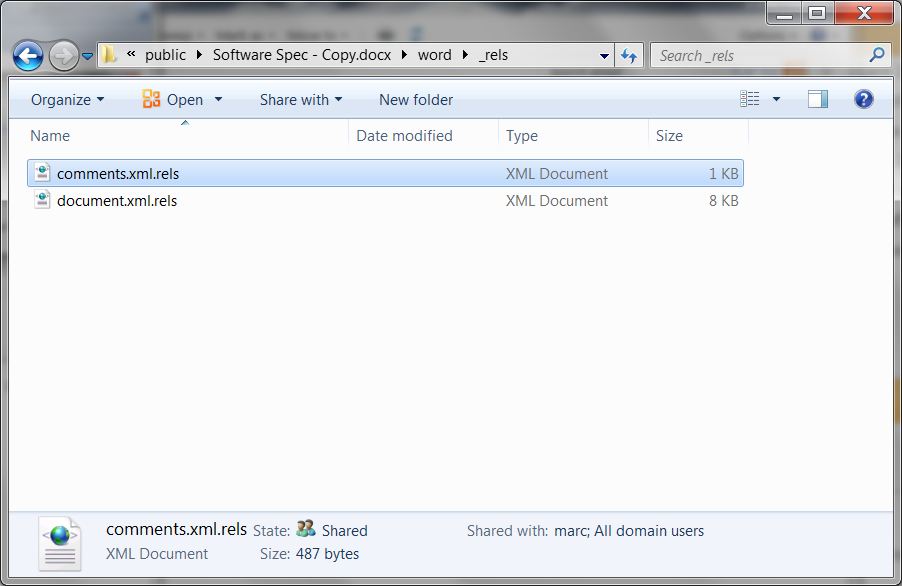
This contains the file comments.xml that has the comments in it. But we are also considering that the comments have hyperlinks in them, so we need to go even further and go into the _rels folder. 

OPC - Word Comments Screen3

In the _rels folder there is a comments.xml.rels file that contains the hyperlinks that are used in the comments. Together the comments.xml and the comments.xml.rels can be used to get what we want. (If you don't have a comments.xml.rels it means your comments don't have any hyperlinks in them. See step 2 below for more information)

To get the comments out we'll use an XSL transform on the two XML comment files to transform XML to HTML. So the basic strategy is this :

1. Take the comments.xml as is and place in a directory (we'll call it the transform directory) where we'll do the transformation. A different transform directory than the unzipped folder is best to avoid confusion.

2. In the transform directory, also put the comments.xml.rels file.

If you don't have a comments.xml.rels file, it means the comments in your Word doc don't have any hyperlinks. If this is the case, create an empty comments.xml.rels file. Technically, this isn't really necessary, you can leave out the file and the transform will fail gracefully.

3. In the transform directory, create a transform.xslt file and put the content shown below in the code section in it. 

4. In the transform directory, create a stylesheet.css file and put the content shown below in it. This is optional, but makes the output look nicer. The transform uses speech bubbles to display comments, an idea that comes from http://nicolasgallagher.com/pure-css-speech-bubbles/.

5. Finally, in the comments.xml file, add the line that references the transform.xslt file. This additional line will be the second line in your file. (See full file example in code section below.)

<?xml-stylesheet type="text/xsl" href="transform.xslt"?>

6. See the comments with transformation and stylesheet applied. Once upon a time, you could just open the comments.xml file in a browser and the comments would be transformed. Over time, security made this trickier and rightly so. If you are a developer, you probably have your favorite way to transform the XML to HTML, like using Visual Studio. The easiest way we found to do is as follows:

a. Be sure all Edge browser windows are closed and start a new version with:

Windows Key W + R
msedge --allow-file-access-from-files

b. Or, if you work in Chrome, close all Chrome browser windows and start a new version with:

Windows Key W+ R
chrome --allow-file-access-from-files

c. Drag the comments.xml into the new browser window and the browser should transform the XML for you.

d. Kill the browser started because you should only use it for this test.

Run dialog box opening Edge to allow file access from files


Extending the transform


Above we specified that we were dealing with comments with hyperlinks. But, more generally, comments in a Word file can have images, SmartArt and a lot more. To make the comment extraction method given here more robust you would need to modify the XSLT to take all this into account. For example, if you inserted a SmartArt Graphic into a comment, the word\comments.xml file would reference a relationship in the word\_rels\comments.xml.rels file which would reference word\diagrams\data1.xml (for example) that might in turn reference another file \word\diagrams\drawing1.xml (for example). The point is, it can get quite complicated and all the paths need to be followed to reconstruct the comments as they appear in the document.

Note that we have to deal with two XML files, comments.xml and comments.xml.rels, with one transform. We do this by using the XSLT document function. Notice in the transform.xlst there is this line:

<xsl:variable name="rels" select="document('comments.xml.rels')"/>

Full code examples


Example comments.xml file (a snippet):

<?xml version="1.0" encoding="UTF-8" standalone="yes"?>
<?xml-stylesheet type="text/xsl" href="transform.xslt"?>
<w:comments xmlns:wpc="http://schemas.microsoft.com/office/word/2010/wordprocessingCanvas"
           xmlns:mc="http://schemas.openxmlformats.org/markup-compatibility/2006"
           xmlns:o="urn:schemas-microsoft-com:office:office"
           xmlns:r="http://schemas.openxmlformats.org/officeDocument/2006/relationships"
           xmlns:m="http://schemas.openxmlformats.org/officeDocument/2006/math"
           xmlns:v="urn:schemas-microsoft-com:vml"
           xmlns:wp14="http://schemas.microsoft.com/office/word/2010/wordprocessingDrawing"
           xmlns:wp="http://schemas.openxmlformats.org/drawingml/2006/wordprocessingDrawing"
           xmlns:w10="urn:schemas-microsoft-com:office:word"
           xmlns:w="http://schemas.openxmlformats.org/wordprocessingml/2006/main"
           xmlns:w14="http://schemas.microsoft.com/office/word/2010/wordml"
           xmlns:wpg="http://schemas.microsoft.com/office/word/2010/wordprocessingGroup"
           xmlns:wpi="http://schemas.microsoft.com/office/word/2010/wordprocessingInk"
           xmlns:wne="http://schemas.microsoft.com/office/word/2006/wordml"
           xmlns:wps="http://schemas.microsoft.com/office/word/2010/wordprocessingShape" mc:Ignorable="w14 wp14">
   <w:comment w:id="8" w:author="Arthur Smash" w:date="2011-02-21T13:10:00Z" w:initials="AS">
       <w:p w14:paraId="522F5EC4" w14:textId="77777777" w:rsidR="00C60769" w:rsidRDefault="00C60769">
           <w:pPr>
               <w:pStyle w:val="CommentText"/>
           </w:pPr>
           <w:r>
               <w:rPr>
                   <w:rStyle w:val="CommentReference"/>
               </w:rPr>
               <w:annotationRef/>
           </w:r>
           <w:r>
               <w:t>We need to add more to this section so readers know what is going on here.</w:t>
           </w:r>
       </w:p>
       <w:p w14:paraId="5E190A2F" w14:textId="77777777" w:rsidR="00C60769" w:rsidRDefault="00C60769">
           <w:pPr>
               <w:pStyle w:val="CommentText"/>
           </w:pPr>
       </w:p>
       <w:p w14:paraId="632FBBEE" w14:textId="01A8A8C9" w:rsidR="00C60769" w:rsidRDefault="00C60769">
           <w:pPr>
               <w:pStyle w:val="CommentText"/>
           </w:pPr>
           <w:r>
               <w:t xml:space="preserve"> For background reading see the one page spec I put together last week.</w:t>
           </w:r>
       </w:p>
   </w:comment>

The transform.xslt file (downloadable version is here):

<?xml version="1.0" encoding="utf-8"?>
<xsl:stylesheet version="1.0" xmlns:xsl="http://www.w3.org/1999/XSL/Transform"
               xmlns:msxsl="urn:schemas-microsoft-com:xslt"
               xmlns:w="http://schemas.openxmlformats.org/wordprocessingml/2006/main"
               xmlns:r="http://schemas.openxmlformats.org/officeDocument/2006/relationships"
               exclude-result-prefixes="msxsl">
   <xsl:variable name="rels" select="document('comments.xml.rels')"/>
   <xsl:output method="html" doctype-public="html"/>
   <xsl:template match="w:comments">
       <html lang="en">
           <head>
               <title>Comments from Word</title>
               <link href="stylesheet.css" rel="stylesheet" type="text/css" />
           </head>
           <body>
               <xsl:for-each select="w:comment">
                   <div>
                       <i>
                           <xsl:value-of select="@w:author"/>
                       </i> on
                       <i>
                           <xsl:value-of select="@w:date"/>
                       </i> said
                   </div>
                   <div class="triangle-isosceles top">
                       <xsl:for-each select="w:p">
                           <p>
                               <xsl:for-each select="child::node()">
                                   <xsl:choose>
                                       <xsl:when test="name()='w:hyperlink'">
                                           <xsl:variable name="cId" select="@r:id"/>
                                           <xsl:variable name="link" select="$rels//*[@Id=$cId]/@Target"/>
                                           <a href="{$link}">
                                               <xsl:value-of select="./w:r"/>
                                           </a>
                                       </xsl:when>
                                       <xsl:when test="name()='w:r'">
                                           <xsl:value-of select="."/>
                                       </xsl:when>
                                   </xsl:choose>
                               </xsl:for-each>
                           </p>
                       </xsl:for-each>
                   </div>
                   <xsl:if test="position() != last()">
                   </xsl:if>
               </xsl:for-each>
           </body>
       </html>
   </xsl:template>
</xsl:stylesheet>


The stylesheet.css file (optional, downloadable version is here):

body
{
   font-family: Verdana;
}

.triangle-isosceles
{
   position: relative;
   padding: 15px;
   margin: 1em 0 3em;
   color: #000;
   background: #f3961c; /* default background for browsers without gradient support */ /* css3 */
   -moz-border-radius: 10px;
   -webkit-border-radius: 10px;
   border-radius: 10px; /* NOTE: webkit gradient implementation is not as per spec */
   background: -webkit-gradient(linear, left top, left bottom, from(#f9d835), to(#f3961c));
   background: -moz-linear-gradient(top, #f9d835, #f3961c);
   background: -o-linear-gradient(top, #f9d835, #f3961c);
}
.triangle-isosceles.top
{
   /* NOTE: webkit gradient implementation is not as per spec */
   background: -webkit-gradient(linear, left top, left bottom, from(#f3961c), to(#f9d835));
   background: -moz-linear-gradient(top, #f3961c, #f9d835);
   background: -o-linear-gradient(top, #f3961c, #f9d835);
}
.triangle-isosceles:after
{
   content: "";
   display: block; /* reduce the damage in FF3.0 */
   position: absolute;
   bottom: -15px; /* value = - border-top-width - border-bottom-width */
   left: 50px; /* controls horizontal position */
   width: 0;
   height: 0;
   border-width: 15px 15px 0; /* vary these values to change the angle of the vertex */
   border-style: solid;
   border-color: #f3961c transparent;
}

.triangle-isosceles.top:after
{
   top: -15px; /* value = - border-top-width - border-bottom-width */
   left: 50px; /* controls horizontal position */
   bottom: auto;
   left: auto;
   border-width: 0 15px 15px; /* vary these values to change the angle of the vertex */
   border-color: #f3961c transparent;
}


A subsequent post describes a C++ program to get comments.

Saturday, February 12, 2011

Tête-à-tête + Picturing a Passion at the Frye Art Museum

Salon-style presentation, Tête-à-tête Exhibit at the Frye Museum Salon-style presentation, Tête-à-tête Exhibit at the Frye Museum 

Seattle patrons of the arts Charles Frye (1858 – 1940) and his wife Emma Frye ( – 1934) are who we have to thank for today’s Frye Art Museum which was built in 1952 to house their art collection. The Fryes made their fortune in the meat-packing business which boomed during the Klondike Gold Rush. 

From their first painting purchased in 1893 to the death of Emma, the couple collected more than 230 works. Most of the work is from the Munich School, reflecting their German background and interest in European realism. One hundred fifty of those paintings are on display at the Frye from February 6, 2010 – January 15, 2012. 

In the exhibit Tête-à-tête, the curators have recreated the “sumptuous viewing experience enjoyed by visitors to the art gallery in Charles and Emma Frye’s Seattle home in the first decades of the twentieth century.” The paintings are hung salon-style, in a dense mass of paintings. Thematically, they all mesh (to our modern, distant eye) and feature either artists from the Munich Secession or artists from the preceding Artists’ Association, the Munich Künstlergenossenschaft. 

In the adjoining exhibit, Picturing a Passion, you get a little background on the Fryes and a view of what their collection looked like through historical photographs of their art collection as it was presented in their home and offices. What we didn’t know was that in 1943, a B-29 bomber crashed into the Frye headquarters. Thirty-two people and a number of animals were killed. As well, art work displayed at the headquarters and art records were lost. For more information on the history of this free(!) museum, see HistoryLink.org. 

Charles and Emma Frye portraits at the Frye Art Museum

Friday, February 4, 2011

Getting Our Italian Passports

The Passports
The Passports as Photographed at Cafe Zuni

Today we flew to San Francisco to apply for our Italian passports. (A previous post details the quest for citizenship, which we happily have!) Our appointments were for the late morning so we had plenty of time to get an early morning flight from Seattle, take the BART from the airport to the Civic Center stop, and walk the few miles to the Italian Consulate at 2590 Webster St.

We arrive at the consulate and hand over our paperwork at the sportello and prepare to wait. Note if you bring money to pay for the passport fee, bring change. We didn’t think to bring change and were missing 20 cents. (The cost of each passport this day was $109.10.) Our thinking was, here’s a one dollar bill, keep the change. But that does not work here. We end up borrowing 20 cents from someone in the waiting room.

A few minutes go by and the small waiting room starts filling up with people with all sorts of requests: someone collecting a pension, someone needing to have a legal document reviewed, someone with general questions, and others like us getting a passport. It starts to get a little tense. A form not filled out correctly by the pensioner starts some grumbling in those waiting. Then the person who handles passports comes out with his date book and informs us that we are there one month too early! I guess in our excitement we heard February 4th and not March 4th. Oops. He is very accommodating since we travelled to get there and asks us if we could come back in a one hour – which is fine by us. So off we go for a coffee and some hand-wringing.

We arrive back at the consulate later and the waiting room has cleared out and we are the only ones there. By the way did we have the 20 cents? Somehow in the time we were gone, the 20 cents disappeared. A quick trip several blocks away to buy a pack of gum and get 50 cents in dimes. Once inside the consulate (finally past the sportello!) everything goes smoothly and it takes about 25-30 minutes per person to process the passport information and create the passport on the spot! We walked out of the consulate with the passports!

We have to say that the folks there were great: from the staff working the sportello, to an intern who answered questions patiently, the man who processed our passports. They made our day.

The Italian Consulate, San Francisco (entrance is on the side to the right)
Italian Consulate San Francisco


View from Coit Tower
San Francisco Skyline from Coit Tower