Showing posts with label scrapbook. Show all posts

Monday, June 15, 2026

From Scrapbook to Zettelkasten: Discovering the Slip Box


Zettelkasten mock up with Scrapbook themes. Sawangwongse Yawnghwe work at the Venice Biennale 2026
Left: Zettelkasten mock up with Scrapbook themes.
Right: Sawangwongse Yawnghwe work at the Venice Biennale 2026.

File Under: A Conversation in Venice


At the Venice Biennale 2026, we found ourselves standing in front of a group of paintings by Sawangwongse Yawnghwe. The paintings looked a little like diagrams and a little like maps, although they were not the sort of maps that would reliably get you from one place to another. Words, names, arrows, and relationships organically spread across the surface. They seemed to be conveying a complicated political history all at once.

We started talking with another visitor, a German art teacher named Philipp. He seemed also interested in the graphical nature of the art. One topic led to another and we ended up talking about note taking and saving information. Philipp mentioned Notion, the digital workspace used for organizing notes and projects. He also mentioned the German sociologist Niklas Luhmann and the philosopher Hans Blumenberg. Both were known for maintaining elaborate collections of notes using a system called Zettelkasten.

It sounded slightly formidable, as German words can when you see them for the first time. But the literal translation is unassuming: a box of slips of paper. A slip box.

We made a note of the word, along with notes about the conversation, and continued through the exhibition.

Later, we entered the exchange with Philipp into Scrapbook and asked what else in our collection might be related to the idea of the Zettelkasten.

That was when things became interesting.

File Under: The Slip Box


A Zettelkasten is a collection of individual notes, traditionally written on small pieces of paper or index cards and kept in a box. But it is not simply a filing cabinet in miniature.

The important part is linking between notes. A note does not sit alone under a broad heading and wait patiently to be retrieved. It points to other notes. One thought leads to another. A new note can branch off from an older one, connect two subjects that had previously seemed unrelated, or become the start of a trail that grows over time.

Niklas Luhmann’s Zettelkasten became famous partly because of its scale. Over decades, he accumulated tens of thousands of notes and used them as a working partner in his writing. The system did not merely help him remember things. It helped him encounter his own ideas again in new combinations.

This is the part that caught our attention.

Most organizational systems promise to help you put things in the correct place. A Zettelkasten seems to accept that the more interesting question is what might happen when two things placed years apart unexpectedly find each other.

There is an appealing modesty to the physical object. No elaborate machinery is required. You need paper, a box, a way of numbering notes, and enough patience (stubbornness?) to create links between them. Intelligence is not hidden inside the box. Rather, it accumulates gradually through the act of connecting one thought to another.

Our Scrapbook is not a Zettelkasten in any strict sense. It contains photographs, journal entries, maps, recipes, travel notes, and various fragments that seemed worth saving at the time. It has categories, links, metadata, and search. It has also become much larger and stranger than anything that could fit comfortably into a wooden card catalogue.

What was satisfying with learning about Zettelkasten was that the underlying idea felt familiar. We had been circling around it for years, although not always aware of it.

File Under: Communication Partner


Luhmann is the right center of gravity for this story, not simply because he kept a very large number of index cards. Other people have managed that, especially if they have ever attempted to organize a lifetime of recipes, jokes, or book notes.

What makes his system interesting is the way he described his relationship with it. A mature Zettelkasten was not merely a storage box or an external memory. It became a kind of communication partner.

At first, a collection gives back only what you put into it. You write a note, place it somewhere sensible, and retrieve it later. But as the notes multiply and the links between them accumulate, the system begins to develop enough internal complexity to surprise you. A new entry leads to an old one you had forgotten. Two thoughts written years apart suddenly sit next to each other and suggest a third. The system returns something that was already yours, but not in a form you had anticipated.

This is not magic. The slip box has not become sentient. It is still paper, numbering, cross-references, and the accumulated work of the person tending it. But, in a way it feels like it is communicating with us.

We have written elsewhere about Scrapbook starting to "talk back" after we added a large language model (LLM) to it. That phrase now seems less novel than we first thought. Luhmann had already described a similar experience with his paper system. The tools were different, but the surprise was recognizable: a collection could become more than a passive repository. It could participate in the development of an idea.

File Under: Recursion


There is a pleasing recursion to how this all played out.

First, we were standing in front of Yawnghwe’s paintings at the Biennale, looking at diagrams that attempted to capture complicated networks of political history.

Then we began talking with Philipp. The conversation wandered from the paintings to Notion, then to Luhmann, Blumenberg, and the Zettelkasten.

We entered the new term into Scrapbook.

Later, we asked Scrapbook where we had encountered related ideas before.

The assistant (looking only at our data) reached backward through the collection and returned with a small intellectual family tree: the cabinet of curiosities, Vannevar Bush’s memex, the Microsoft Research project MyLifeBits, and our own earlier attempts to describe Scrapbook. All of these are detailed entries in Scrapbook.

We had not filed those older notes under Zettelkasten because we had not yet learned the word. But there they were related, waiting patiently in digital drawers.

The relationship is not a clean historical progression. The Zettelkasten predates several of the digital projects. It is better to think of these as overlapping attempts to solve related problems:

Cabinet of curiosities
A personal collection of objects and fragments chosen because they matter to the collector.

Zettelkasten
A network of linked notes designed not only to preserve ideas but also to generate new ones.

Memex
Vannevar Bush’s imagined personal archive, navigated through associative trails rather than rigid hierarchies.

MyLifeBits
A digital attempt to capture and connect the documents, images, and other traces of a life.

Scrapbook
Our homegrown combination of archive, journal, database, photo collection, linked notes, and now LLM-assisted retrieval.

The amusing part is that the Scrapbook assistant surfaced this connection by behaving in a way that seemed suspiciously close to the point of a Zettelkasten. It returned a set of old notes in a new combination and helped us see an argument that had been taking shape without us noticing it.

We discovered the Zettelkasten twice: first through a conversation in Venice and then through Scrapbook’s ability to connect that conversation to older fragments of our own thinking.  

File Under: Tension


Our previous Scrapbook posts reveal two slightly different impulses.

The first is intentional curation. In our earlier post, Seven Laws of Organization and Disorganization, Scrapbook appears as our small rebellion against the chaos of camera rolls, social-media feeds, scattered chats, and cloud-based systems that save everything while making it surprisingly difficult to find anything. Each Scrapbook entry is a deliberate act of remembering.

The second impulse is productive surprise. In our earlier post about Scrapbook as a digital cabinet of curiosities and vademecum, the collection is not valuable only because it is orderly. It is valuable because an old photograph, a stray note, or an observation made during a trip can lead somewhere unexpected.

A Zettelkasten sits between these two impulses.

It requires curation. Notes must be written, linked, numbered, and tended. But it cannot be too tidy. Its usefulness depends on a certain controlled disorder. The point is not merely to place each note in the correct drawer. The point is to create enough trails that an older thought can return in a new context.

Scrapbook has always lived somewhere in this tension. We built it to impose a little order on our lives. However, after many years, we are starting to learn its greatest value may be its ability to return some of the disorder to us in useful forms.

The reward for carefully organizing your life for years is that your filing system could eventually start making suggestions.

File Under: Same Old Problem


We should be clear: we are not claiming to have invented anything. We are not Vannevar Bush, Niklas Luhmann, or Hans Blumenberg. We are two people who save too many digital artifacts and occasionally manage to find them again when we need them.

What struck us about discovering the Zettelkasten was not that we had unknowingly built one. We had not, at least, not in any strict sense. Scrapbook is too sprawling for that: part archive, part database, part journal, part photo album, part cabinet of curiosities, and now part talkative assistant.

What struck us was that we had been dancing around the same problem for years.

How do you collect the fragments of a life without turning them into an inert pile? How do you leave enough trails that one thought can lead back to another? How do you create a system orderly enough to be useful but loose enough to surprise you?

People have been worrying about these questions for a long time, using whatever tools happened to be available to them. Paper slips in boxes. Index cards. Cabinets. Microfilm. Hyperlinks. Databases. Search engines. Now large language models. Technology changes, but the itch remains much the same.

Perhaps the fact that we are so interested in this says something about us. We like collections. We like categories, except when we don't. We like the feeling that a forgotten meal, a half-remembered walk, or an idea scribbled down years ago has not entirely disappeared.

There may also be faint anxiety underneath it all: the suspicion that a life can become inaccessible even to the people who lived it.

This feels especially relevant now because many of us store large portions of our lives inside systems we did not design. Our photographs live in camera rolls and cloud libraries. Our observations sit inside old chats, social-media feeds, and apps we may stop using in three years. These platforms are often very good at saving things. They are also very good at deciding, on our behalf, which things should return.

A phone offers a memory from five years ago because its algorithm has noticed a date, a face, or a location. A social platform resurfaces a post because it expects a reaction. Sometimes the result is delightful. Sometimes it is baffling. But in either case, the editorial decision is not entirely ours. The system channels the story.

Scrapbook is our small attempt to preserve a little more agency. It is not perfect. It still contains unclear notes, missing links, duplicate entries, and photographs we will probably never identify. Its assistant sometimes makes connections that are illuminating and sometimes makes connections that are simply wrong.

But at least it is rummaging through our mess, a mess we chose and can still edit.

And in this case, it did something useful. We encountered the idea of the Zettelkasten in Venice, added it to Scrapbook, and asked a question. Scrapbook reached backward and found a trail we had not quite seen before: cabinets of curiosities, the memex, MyLifeBits, our own old notes about organization, and the system itself.

The question is no longer whether we can save everything. We more or less can. The harder question is whether we will still have a say in how our own stories are assembled, connected, and returned to us. A Zettelkasten is one answer. Scrapbook is our imperfect answer. At the very least, we would rather do some of the remembering ourselves.

Monday, April 6, 2026

From Scrapbook to Storyteller: Our Very Own Primer

We didn’t mean to build a storyteller. We meant to build better search capabilities over our personal information. But stories are what surfaced, threads we hadn't realize we’d left for ourselves, links between moments separated by years, and reminders that small details matter.

The Scrapbook Primer - understanding the past to make better future decisions


Overview


Back in February 2024, we shared an update on our Scrapbook project, a tool we've used for many years to organize our lives. As we have described in different posts on the subject, Scrapbook is like our memory chest: searchable, organized, and expandable. In the last year, something interesting has happened. It's learned to talk back.

What we've done is woven a large language model (LLM) into the heart of Scrapbook. It doesn't roam the internet unless we ask it to. It answers questions using our corpus of data. It lives entirely inside our world of words and pictures answering questions, surfacing connections, and connecting threads between moments that even we'd forgotten.

Our data is broken into tens of thousands of entries, with each entry including text, digital assets, and links to other entries. The text of an entry can be anywhere from a few words to thousands of words. In short, there there is fair amount of material for an LLM to work with.


Literary Déjà Vu


The more we use our LLM-enabled Scrapbook, the more it reminds us of Neal Stephenson's The Diamond Age and its Young Lady's Illustrated Primer, a fictional, adaptive book which could teach, guide, and grow alongside its reader.

Like the Primer, our Scrapbook is becoming more than a static repository:

  • It adapts — tailoring its responses to the quirks, references, and rhythms of our own material.
  • It guides — when we search for a trip, a recipe, or an old photo, it brings back more than just the thing itself; it recalls the surrounding story.
  • It connects dots — sometimes between entries years apart, revealing patterns we never set out to find.

The Primer in The Diamond Age was a thought experiment about how a tool could shape its reader’s growth through tailored narrative. Our version isn't teaching martial arts to Victorian ingénues, but it is helping us understand and navigate our own history in a way that's private, persistent, and woven into the things that matter to us.

We didn't set out to build a piece of science fiction. But step by step, feature by feature, Scrapbook has edged closer to being a kind of personal storyteller. Not just a record of where we've been, but a guide to help us decide where to go next.


How does it work


There is a lot going on, but here is the high level overview:

  • Our solution creates a ChatGPT-like frontend experience over your own Cosmos NoSQL documents using RAG (Retrieval Augmented Generation).
  • We use Azure OpenAI Service to access GPT models, and Azure AI Search for data indexing and retrieval.
  • Our assistant is hosted in a Blazor application that has allows for adding and curating data.


First impressions


How's it working? In the first few months (mid 2025) of working with it, we found largely what you find with LLMs: they can be brilliant in the best of times and hallucinatory in the worst of times. Though, when it hallucinates on a body of data we know well, it's almost kind of funny and we can spot it easier.

Then we got to coding and updated the APIs we were using (migration from the Assistants API to Responses API), got access to GPT 5 models, rebuilt vector store for use in AI file search tool, and rewrote our system prompts. After this code push (early 2026), the Scrapbook Assistant was brilliant consistently and stable, with way less hallucinations. Phew! In many cases, it behaves almost like a magician in what it surfaces (correctly).

Given that LLMs work with words, our words matter. How we curate our data matters. No surprise, right? When we create a Scrapbook entry for an important event it really behooves us to be clear about who did and said what if we want to that be surfaced correctly later.

Writing clearly and consistently is key. In fact, after asking questions of our assistant, we often realize we need to go back and do editorial work. After the text changes, and rerunning the indexes for the LLM, the results improve. Another nonsurprise: It seems all new tools we aim at our Scrapbook corpus of data end up shining a light on how important curation is.

To date, our Scrapbook Assistant is great with words and less so with dates and ordering. For example, if we ask it to tell us about hikes (a Scrapbook data category) that we really liked recently, it doesn’t do what you might expect. It returns hikes we rated highly but may include some from recent times and some from way back. We don’t understand enough yet to know how to control this. We are very much in the early phases of this, and our guess is that this too will be something that gets improved.


Examples


There's a certain pleasure in discovering what you experienced but forgot. We now have conversations with our Scrapbook Assistant and collaborate with it.

Give me a rundown of glaciers we have visited.

We get back not just the date, but the glacier in context of what trip we were on, when, and a summary, size depending on model selected.

Query - rundown of glaciers - model - balanced 5.4-mini

Tell me about the foods that Ottavia likes to eat?

We get back notes and anecdotes from dinners together we had together. It makes planning future meals together much easier. Our friend has a lot of food dislikes, so it's always good to check.

Explain our tax liability for the year 2024.

Try this looking in a filing cabinet!

What is the booking info for the last time we stayed in Berlin?

Out comes everything you need to understand length, price, contact info, and even what rooms you stayed in and liked. This works because all hotel and accommodations are recorded.

Query - Berlin booking - model - verbose 5.3-chat


Give me some ideas for a Travelmarx-style blog post for the hike we did recently to Misma?

Hikes and in general large-effort activities are part of Scrapbook. We jot some notes down, and the activity is part of a larger unfolding of events that the assistant can tap into and tell a story. Also, all old blogs (hundreds and hundreds) are archived as entries in Scrapbook, so there is a lot to pull from to understand Travelmarx-style. Result is here: Le Vie di Misma - Trails 511 and 510.

What are some ideas from notes and previous food entries for a gluten-free friend visiting for a few days?

Indispensable guidance.

What is the recipe for a garbanzo bean dish we had in Seville?

No more searching around for recipes to share. And with the Scrapbook Assistant, follow up with “translate into Italian”.

Query - garbanzo beans - model - verbose 5.3-chat

Give me a one paragraph summary of our Japan 2025 trip including places visited and length of time at each stop.

These kinds of quick summaries of past events are super useful when someone asks. We can just ask the assistant without much time spent. We can customize the response for a friend who is interested in tours we took. In the response are links back to each individual item.

Query - Japan summary - model - balanced 5.4-mini (with spelling error in query) 2


Saturday, February 3, 2024

Update on Our Scrapbook Project


History


Scrapbook is what we call our software/service platform that is part personal information management system, part asset management system, part diary and journal, and part digital keepsake. Here are some existing blog entries describing our Scrapbook project:

Since we started writing about Scrapbook, technologies have come and gone. Technologies we mention in the 2017 post for example have taken a back seat to the new technology of the day AI agents and large language models. That said, throughout the years the basic theme we’ve tried to illustrate and encourage is that you should take ownership of your own data regardless of the technology.

Growth


Here are some facts and figures about Scrapbook at it stands at the beginning of 2024.

In our main collection “MyJournal”, we have over 16,600 entries distributed over 30 categories. Each entry is a JSON document stored in Azure Cosmos and associated assets (images, videos, documents, etc.) stored in Azure Blob Storage. (We use other Azure services like registry, key vault, app registration, and more.)
 
  
Left: Growth of two Scrapbook collections. Right: Category distribution for MyJournal collection.


There are over 21,000 links between entries. A link can be something like A is related to B or A is in B.

We estimate that we use Scrapbook around 30-60 minutes a day, which means adding new entries, editing existing entries, and looking up information. The amount of development time is another thing!

Costs to run our Scrapbook depend on many factors such as amount of storage, services used, and regions selected to name just a few. For example, if you are setting up a prototype of our Scrapbook with minimal services and redundancy, you might be looking at 20 - 50 USD or so a month as a ballpark figure.

Recent Activity


This is what we’ve been up to since the last post. (Utterances are in quotes. Underlined words are a category type or a synonym of a category. We use # and @ as in other platforms for hashtags and mentions.)

Containerization

We moved from Azure App Service to Azure App Containers. There were several assumptions made when using App Service that did not work when going to containers. For example, for our container version of Scrapbook, we needed to re-think our Data Protection Layer and how we were handling/storing session state. Here’s what we followed:

Automated ingest

We found ourselves doing too much manual work to capture data. So we created hooks to pull in different types of data.

For example, our Travelmarx blog RSS feed (for one post) can be pulled in and automatically converted from HTML to markdown with all the photos pulled in to create a new Scrapbook entry. We have a similar hook we use for Spotify API and our Lostvibe music collection. The goal here is to use Scrapbook as a backup of other content creation points and to automate entry creation.

Natural language improvements

We rewrote from scratch our Natural Language Query Engine (see this post) to use Cognitive Language Understanding (CLU). We migrated from Azure LUIS (deprecated) to CLU.

The query engine now supports
  • Sorting, for example:
    • “Show my wines from France sorted by rating”
    • “Tell me about books sorted by modified date”
    • “What are hikes sorted by length ascending”
  • Compound logic (logical operators in queries
    • “Show me albums with the keyword cowboy and keyword blue”
  • Numerical comparisons (nice for rating fields)
    • “Show me hikes longer than 20 km”
  • Qualitative comparisons (high, low, great, bad)
    • “Show our favorite hikes great than 20 km”
  • Inferred queries - “show hashtag XYZ”, “show @person”
    • “Show Greece last year”
    • “Tell me about @Roberto”
  • Negations
    • “Show me items without assets”
    • “Show me activities except for yoga”
    • “Show me food except pasta”
    • “Show me books without ratings”
    • “Show me dining out without lunch”
We know that our NL query engine is a bridge to the time when we can implement Large Language Models (LLM), which at this point seem like our future.

First class assets

We promoted assets to be their own document records in Cosmos.

When we started years ago, Item records were the only document type and everything was packed into them. First, we pulled out relationship data (we call them edges) into their own records. Now, we did the same with assets.

It’s kind of like a normalization you’d do in traditional databases.

Asset document records will help us capture richer data around assets as we move forward and not clutter Item records with asset-related data. Think of AI work, OCR, tagging, etc. Updates can be done to each Asset record without updating Item records. While partial updates exist in Cosmos, updating an Item to update Asset info is clumsy. Plus, separate Asset records allow more easily sharing of assets between items.

Moving to Blazor

The current version of Scrapbook that we run is based on ASP.NET MVC / Web Forms.

As described here, “...ASP.NET Web Forms framework is based on a page-centric architecture. Each HTTP request for a location in the app is a separate page with which ASP.NET responds.”

On the other hand, “Blazor is a client-side web UI framework similar in nature to JavaScript front-end frameworks like Angular or React. Blazor handles user interactions and renders the necessary UI updates. Blazor isn't based on a request-reply model. User interactions are handled as events that aren't in the context of any particular HTTP request.”

We invested a lot of time in our ASP.NET Core MVC architecture with its server-side razor pages, JavaScript, and Bootstrap. This has proven to be solid for us. And usuable from desktop or mobile. But we are at a point where we can’t make changes as quickly as we’d like and the code is complicated, especially the JavaScript we’ve developed.

So, we’ve been working hard on a Blazor implementation of Scrapbook. There is a big difference between these two approaches. As it goes with new technology, you start rearchitecting and rethinking a lot of what you have done not so well 😊.

Interesting Scenarios


We covered scenarios in the post: Scrapbook Platform – A Personal Information System – Ten User Scenarios. Here we’ll mention just a few others we find particularly useful.

Organizing and documenting trips

We are now using Scrapbook to stub out upcoming trips. If work turns out to just be planning, that’s fine. We keep it in Scrapbook. Our philosophy is of it is something we spent time to prepare, something we learned about, we save it. Chances are it could be useful later.

Years later, it’s easy and gratifying to use a simple query to pull up everything related to the trip. For example, with our Natural Language query capability, we can say “Show hashtag #Turkey2023” and pull up all the related items for the trip.

show hashtag turkey2023
Query "show hashtag Turkey2023". Behind each of these image tiles is as much data about the item as we put in. Who, what, where, when and how.

Staying on the theme of Turkey, we could also query:
  • “Show museums in Istanbul”
  • “Show me hotels in Pamukkale, Turkey”
  • “What were our favorite restaurants in within 10 km of Ephesus”
We often get asked by friends for travel recommendations. Our platform makes it easier to pull out this information.


Capturing recurring themes

It’s often the case that the same subject comes up in different contexts (a museum exhibition, a talk) and it captures our attention. For example, in September 2023 we went to a museum in Spoleto where we saw Beverly Pepper sculptures. The name seemed familiar, and it was because we had saved an article 10 years ago in Scrapbook that was about her. It was very gratifying to make the connection between the new entry and the old entry.

Another example is an idea that we return to a lot in different contexts and that is “memory house”. We can links items together dealing with the subject and create a hashtag to quickly access them.

show hashtag memoryhouse - redacted Show exhibits with Hayez - redacted
Left: Query "show hashtag memoryhouse". Right: "show exhibits with hayez".


Other examples:
  • “Show me articles with democracy”
  • “Show me books about naples”
  • “Show me items with Pythagoras”.

Collection of ideas

We’ve started thinking that our platform is really a “research platform”. The things it contains could be about physical things, but just as easily about ideas or anything really.

Take our category “Books”. It includes books we’ve read and own and ones we haven’t read or don’t own. For example, when friends recommend books to us, and we make notes on them, and may read them, but always save any information as a “book” entry. Also, we often read a lot about a book and understand its major themes but never actually read it. We make a note of all that information and save it as a book entry. This is the sense of research platform that we are talking about.

Another example is our “Botanical” category. It contains plants we own, we owned and don’t anymore, and ones we may have seen in a garden somewhere. The idea is to give all these plants an “entry” in Scrapbook.

show books - redacted - card view  show books in 2005
Left: Query "show books" in card view. Right: Query "show books in 2005" in list view.


show botanical - image view
Query "show botanical" in image view.


Other example queries:
  • “Show books read in 2005”
  • “Show plants in the family Crassulaceae”

Museum visits are more interesting

We like going to museums. We often find that we are standing in front of a work (say a painting) and wondering if we’ve seen it before. Often, we think yes, we have. But how to know that? We take out our phones and search for the artist's name in our “exhibition” category. If we find that we have something about the artist, it makes the museum experience richer for us. A connection is made. It’s like having a personal reference guide and context always on hand.


show assets with lorenzo lotto show assets with Picasso
Left: Query "show assets with lorenzo lotto". Right:  Query "Show assets with picasso".

Other related queries:
  • “Show me exhibits with Picasso sorted by date in ascending order
  • “Tell me about museums in Milan, Italy”
  • “What are exhibits that we really liked in 2022”.
  • “Show exhibits with ‘video installation’"

Saturday, April 9, 2022

Analyzing Our Chocolate Habits – The Data Is In

A composite image of 170 chocolate wrappers consumed in 17 years. A map shows countries that we tend to consume chocolate from withing chocolate belt around equator.
Left: A composite image of 170 chocolate wrappers collected over 17 years.
Right: A map shows the countries our chocolate comes from. They all lie within the chocolate belt along the equator
.


In this post we analyze our chocolate consumption habits using data we've collected in our Scrapbook project. We've covered Scrapbook in detail in previous posts (2017 introduction, 2019 our memex, 2021 ten user scenarios, 2022 natural language query parser). In our 2021 ten user scenarios post, we explain Scrapbook like this:

Scrapbook is a software platform for managing personal information. Information is anything that's important to you. For us that includes books, dinners with friends, correspondence, travel summaries, people, and music to name just a few categories. The goal of the Scrapbook platform is to capture, store, and easily recall this information securely, whenever, and wherever.

Nearing 12,000 entries, it becomes increasingly interesting to ask ourselves questions about what insights might in the data that we hadn't anticipated.

We have a lot of entries about chocolate for example. Whenever we bring home a new bar, we make a new entry. We capture the label, our impressions, brand, type, percentage, producer, rating, and origin.  Can we understand a little more about something so many of us take for granted? Where does it come from? Who is making it? What are the qualities of one versus another? What drives our preferences? 

We also have a little fun at our own expense in exposing our vices and consumption habits. We did something similar in the post Orecchiette Pasta Dishes and Recipes for our Favorites: Radish Pesto and Tomato-Broccoli.


How did we approach this analysis?
  • We searched in Scrapbook under category "chocolate" and exported the results to JSON (or CSV).
  • We found 170 chocolate entries covering just under 17 years between February 2005 to October 2021.
  • The JSON data is imported into Excel for analysis and charting. Briefly, in Excel do the following:
    • Load data: Data Menu / Get Data / From File / From JSON
    • Use PowerQueryEditor
    • Create table and expand any columns required.
    • For more information, see the PowerQuery JSON docs.
  • Of the 170 entries, we threw out three which had incomplete data.
  • It's important to note that we don't make an entry for every bar of chocolate we buy or consume.
  • Each entry is a different type or brand of chocolate that we've tried and chosen to document. So that's 170 distinct kinds of chocolate from a lot of different makers. 
  • Some chocolates we've enjoyed only once and others, dozens of times.

What can we say about chocolate?
  • We tend to select chocolate containing between 60% and 80% cocoa content by mass.
  • We rate 4% of chocolate at 5/5, really exceeds expectation. (Example: Venchi: Cuor di Cacao)
  • We rate 31% of chocolate at 4/5, exceeds expectation.
  • We rate 50% of chocolate at 3/5, meets expectation.
  • We rate 3% of chocolate t a1/5, really sucked. (Example: Orion Studentska Milk Chocolate with raisins and nuts.)
  • Chocolate below 60% cacao for us doesn't typically score as high. We also don't buy it very often, which means our data is skewed toward higher cocoa percentage chocolate.
  • A scatter plot of percentage on x-axis and rating on y-axis doesn't reveal as much as we thought it might. The correlation coefficient between rating and percentage is 0.38, which is considered a low correlation. This might mean that percentage isn't the driving factor in our rating, or it is an indication that our sample selection is biased. 

A histogram of chocolate rating (1 bad, 5 good).A histogram of chocolate percentage.A scatterplot of percentage versus rating.
Left: A histogram of chocolate rating (1 bad, 5 good).
Center: A histogram of chocolate percentage.
Right: A scatterplot of percentage versus rating.

We have origin data for less than 50% of our chocolate entries. Most chocolate bars don't disclose where the beans come from, typically because they're made from a blend of beans with multiple origins.

Using the cacao origin data that we do have, we can see on a map that it falls not surprisingly in the so-called "chocolate belt", between 20 degrees above and below the equator, within which Equador, the Dominican Republic, and Peru are the countries from which we tend to collect the most chocolate.

The Dominican Republic shares the island of Hispaniola with Haiti to the west. Hispaniola is just due south and east from Cuba. In preparing this post, we wondered why we've never found chocolate from Haiti, being it shares the same island with Dominican Republic. We'll it's complicated and we won't answer it here, but that's the kind of question looking at our data can prompt. Hawaii, for reference, is on the northern edge of the belt and doesn't produce chocolate, at least not yet.

According to many sources, Ecuador provides the best cacao beans. A weird fact that we found on the Swiss Platform for Sustainable Cocoa is that Iceland consumes the most cocoa per capita at 6.6 kg each year. This might be another reason we love Iceland.  Switzerland is an important producer of cocoa.

One last point if you're sometimes confused as we've been about the distinction between cacao and cocoa: "cacao" refers to the cacao beans or more properly, seeds, themselves. Cocoa more often refers to the products which result from roasting and processing the beans.  The two terms are used interchangeably however, making hard distinctions between the two more academic than practical. 


Wednesday, April 6, 2022

Orecchiette Pasta Dishes and Recipes for our Favorites: Radish Pesto and Tomato-Broccoli

Background | Radish Pesto Recipe | Tomato and Broccoli Recipe

A composite image of pasta dishes with orecchiette that we've had over 2 years.Our favorite orecchiette dish: with radish pesto.
Left: A composite image of pasta dishes with orecchiette that we've had over 2 years.
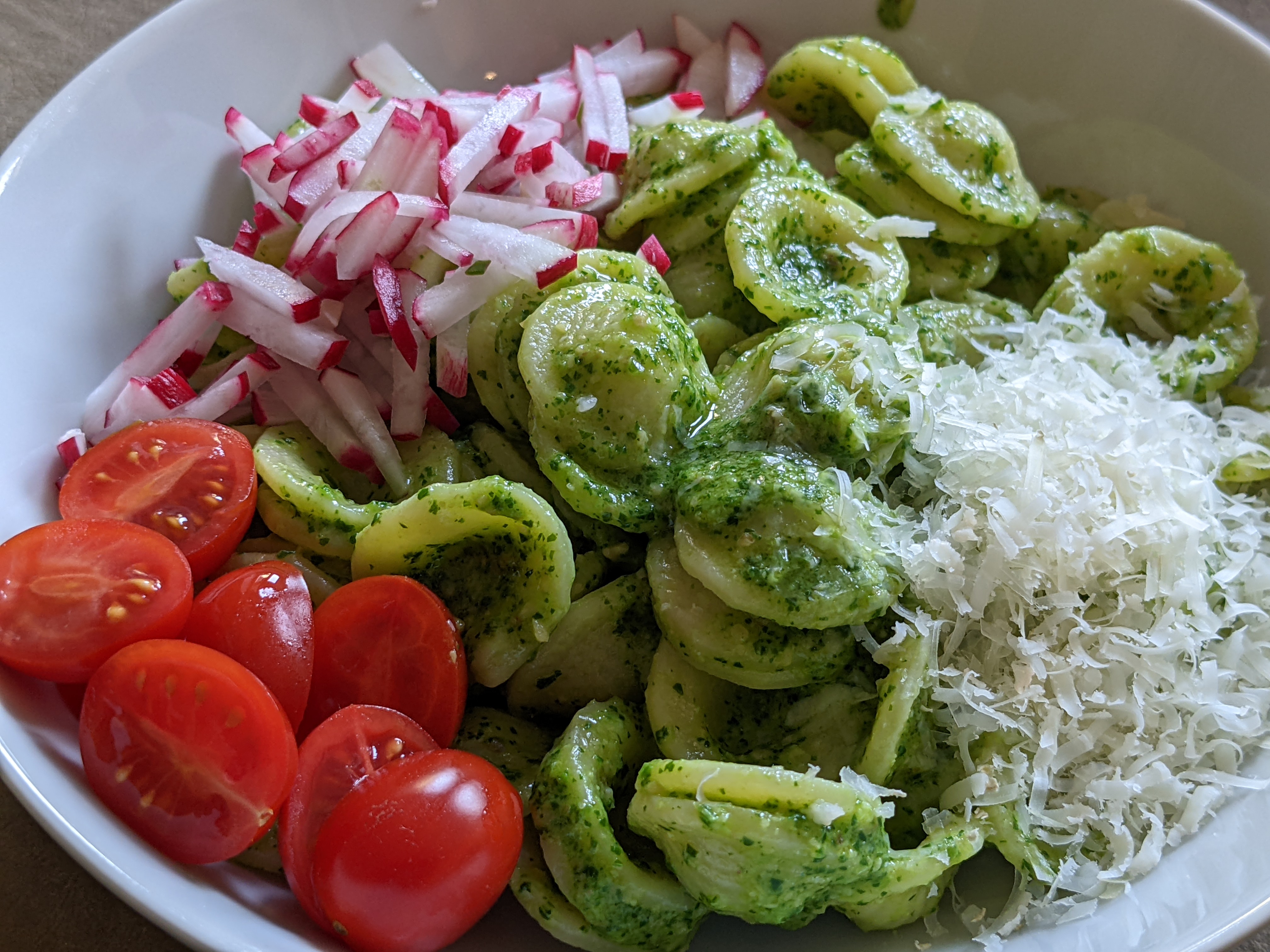
Right: Our favorite orecchiette dish: with radish pesto.


Background


Let's start with the name: orecchiette (plural) and singular orecchietta (singular) comes from the Italian orecchia for ear and the diminutive etta for small.

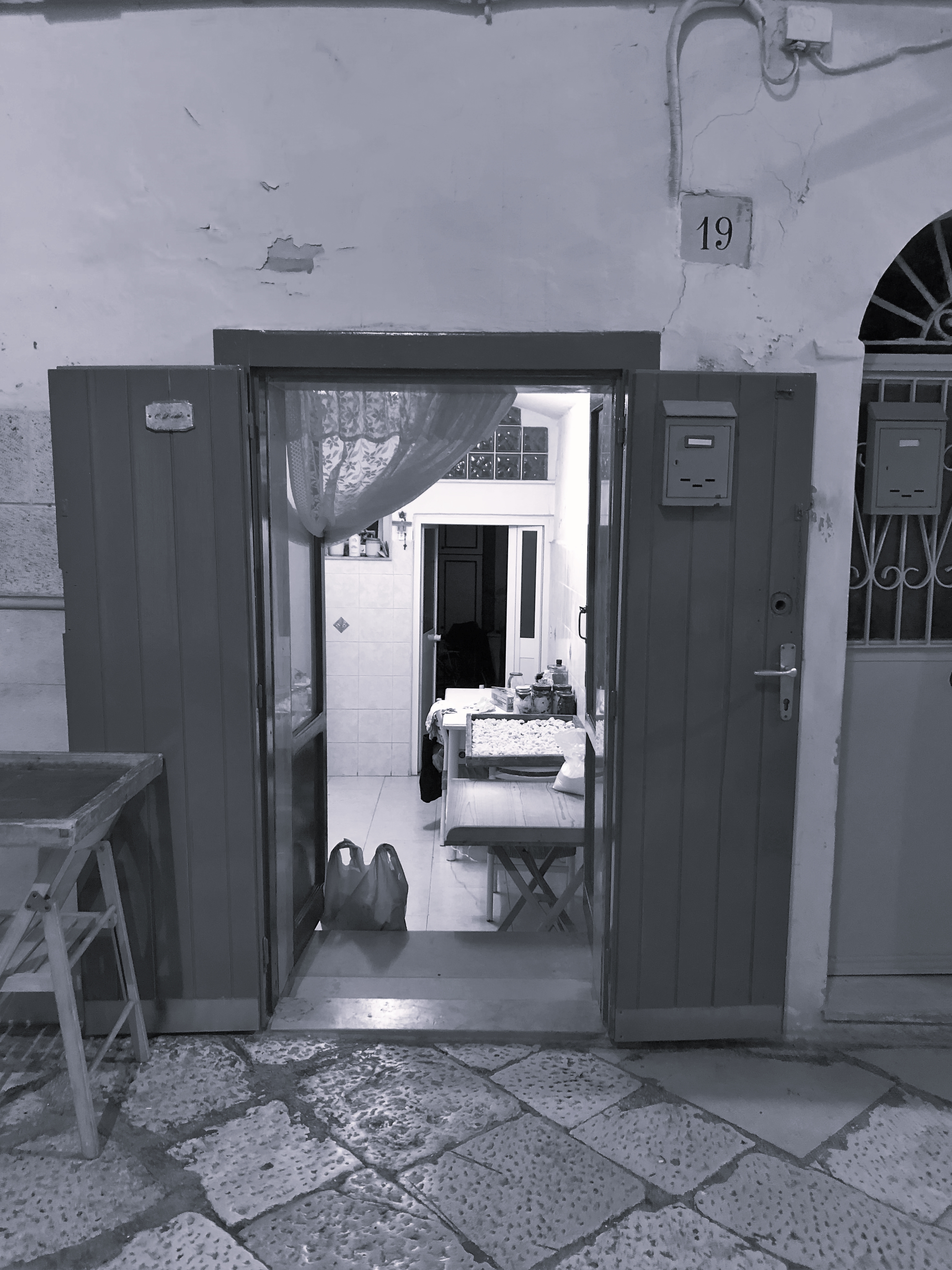
This ear-shaped pasta is a pasta typical of Apulia (Puglia), in Southern Italy. In particular, orecchiette pasta is closely associated with the city of Bari. In the old city there is a street nicknamed la Via delle Orecchiette where you can buy fresh orecchiette displayed outside of family kitchens.

We visited Bari a few years ago over a long weekend in October. It was still warm at night and on the la Via delle Orecchiette and adjacent streets in the old quarters, doors were wide open as living rooms and kitchens spilled out into the narrow streets. Families sat outside their homes talking, kids played, and a neon-lit Padre Pio blessed us as we walked by. It's here you can get your fill of orecchiette.

And if you don't have easy access to fresh, hand-made orecchiette, our favorite brand of dry pasta is De Cecco.


Orecchiette for sale in Bari in October 2019.A kitchen in old town Bari where orecchiette are made.A Father Pio altar in old town Bari.Narrow street of Bari at night.
Left: Orecchiette for sale in Bari in October 2019.
Center left: A kitchen in old town Bari where orecchiette are made.
Center right: A Father Pio altar in old town Bari.
Right: Narrow street of Bari at night.


We have orecchiette pasta in one way, shape, or form a few times a month. Why?
  • The little depressions in the pasta are perfect for holding sauces.
  • The pasta has a nice feel biting into it.
  • Orecchiette, to us, make an attractive presentation on the plate (or bowl!)
What are some of our favorite ways to prepare it?
  • With a pesto made of fresh green radish tops, walnuts, and pecorino. See recipe below.
  • Tossed with zucchini, broccoli rabe, chicory, or artichokes sauteed in olive oil.
  • In a rich cherry tomato sauce with broccoli (or cauliflower). See recipe below.
  • With Sgombro (mackerel) or tuna in a fresh tomato sauce.
  • Sometimes with just a simple tomato sauce.
Why do we even have all these food pics?
  • As part of our interest and research in the area of personal information management, we capture a lot of our day-to-day life, including the dishes we prepare at home or enjoy out. For more information on our work – called Scrapbook – see A Personal Information Management System: Introducing Scrapbook.
  • In the composite image of pasta, the first orecchiette pic was taken April 2nd, 2020 and the last one March 29th, 2022. That's two years of orecchiette, which comes out to be 5.4 orecchiette dishes a month. But who's counting? 

Radish Pesto Recipe for Orecchiette

Inspired by a daily pasta special we had once at Il Corvo in Seattle, this is one of our favorite preparations. (Il Corvo has been closed since May 2020, but now has a sibling in West Seattle called Il Nido, and another opening soon in Waitsburg near Walla Walla to be called Vaccipiano.)


The recipe is simple, flexible, quick to assemble, and very satisfying, dependent only on finding one or two beautiful bunches of radishes with their greens still attached and in full splender.

For six generous portions.

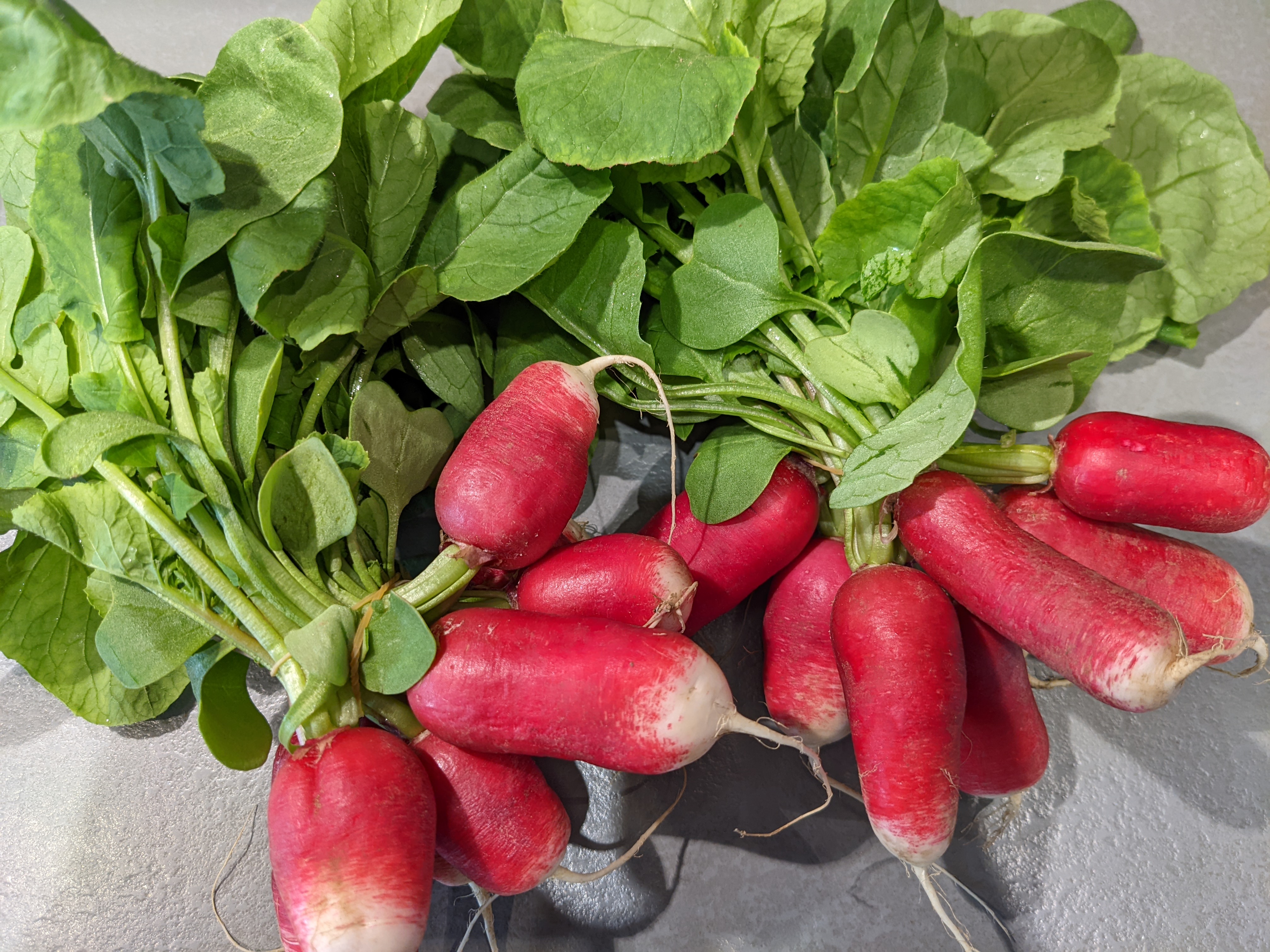
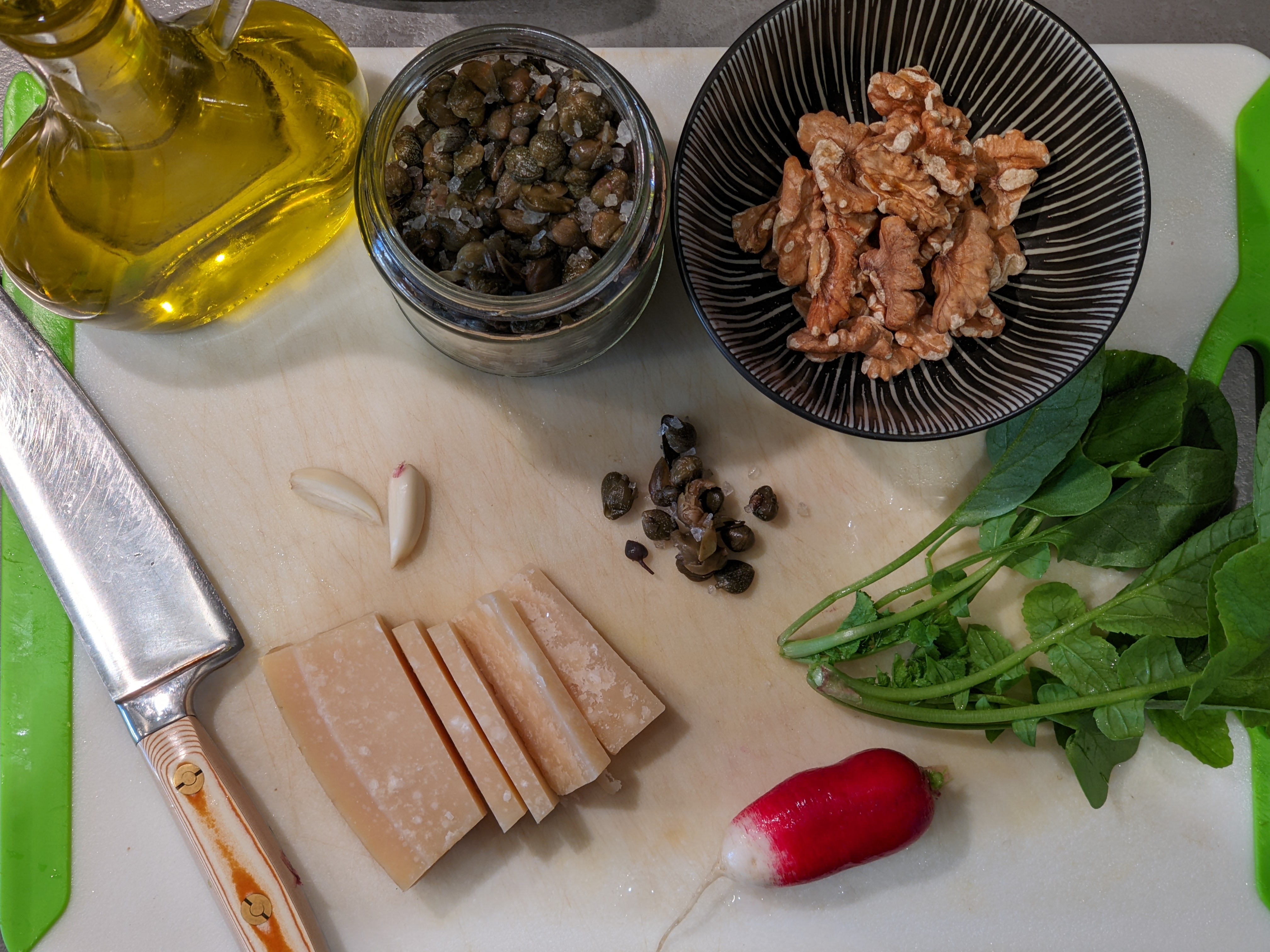
  • 2 bunches of radishes with greens, greens separated, washed, and dry. Set the radishes aside.
  • 1 clove garlic, chopped
  • 1 teaspoon salted capers, rinsed (optional)
  • 40g toasted walnuts
  • 50g pecorino sardo, toscana, or parmigiano reggiano, cut into small pieces
  • 1/2 teaspoon course salt
  • Olive Oil, 1/3-1/2 cup

1. Put the radish greens, (not the radishes themselves) into the bowl of a food processor.

2. Add the garlic, capers, walnuts, cheese, and half of the salt.

3. Pulse to mince everything together.

4. Turn food processor to low, adding olive-oil until mixture reaches the consistency of a thick sauce (pesto!). Try not to over-blend.
Note: An immersion blender can be used instead. You'll want to have a sufficiently narrow, tall container to blend in.
5. Taste for saltiness, adding more coarse salt as desired.

6. Place a portion of the radish pesto in a large bowl. For example, if you're preparing the dish for two people, you'd use about 250g of dry pasta, and a third of the pesto from the recipe above. 

7. Cook pasta in boiling, salted water to al dente. 

8. Drain, saving some of the pasta water.

9. Toss the pasta with the pesto, adding pasta water if too thick.

10. Serve in bowls, garnished with julienned radish and grated pecorino cheese.
Note: Sliced cherry tomatoes and/or sun-dried tomato add both flavor and a great color-pop to the dish.
Orecchiette with radish pesto - starting with radishes.Orecchiette with radish pesto - cleaing radishes and separting greens.Orecchiette with radish pesto - the other ingredients.Orecchiette with radish pesto - the sauce takes shape.Orecchiette with radish pesto - adding the sauce to the pasta.Orecchiette with radish pesto - plated with garnishes.
Six images showing the process of preparing the radish pesto, served with orecchiette.


Fresh Tomato and Broccoli Recipe for Orecchiette

Recipe for 4 small servings or 2 larger servings.

In a large pot, bring water to a boil:

  • Add a palmful of salt to the water for better color and flavor, most of the salt stays with the water,
  • Rinse and break or cut broccoli into bite sized pieces, 1 – 2 lbs or 2 – 3 nice crowns.
  • Parboil until barely tender.
  • Remove to colander to drain and cool.
  • Keep water on flame to cook pasta

In a sauté pan over a low flame add: (pan should be large enough to hold the broccoli too)

  • 3-4 Tbsp olive oil
  • 1 clove fresh minced garlic
  • 1 Tbsp capers, rinsed
  • 2 Tbsp dried currants or raisins
  • 2 Tbsp pine nuts
  • 2-3 Tbsp bread crumbs
  • Pinch red pepper flakes

Allow to sauté until garlic and pine nuts begin to brown:

  • Add 2 anchovy filets or 1 Tbsp anchovy paste.
  • Stir to dissolve.

Cook pasta in broccoli water per box instructions (10-13 minutes for al dente)

  • ~250 grams (half a box) of orecchiette (ear shaped) pasta, but you can use whatever type of pasta you like. The little ears hold the sauce nicely and are easy to eat.

In the meantime, add drained broccoli pieces to the sauté pan with the other ingredients.

Toss or stir gently over medium flame

When ready, combine drained pasta with the broccoli mixture. Toss gently.

Serve with a drizzle of fresh olive oil and grated parmesan or pecorino cheese.


Fresh tomato and broccoli with orecchiette.Our favorite brand of orecchiette: De Cecco.
Left: Fresh tomato and broccoli with orecchiette.
Right: Our favorite brand of orecchiette: De Cecco.